
Best coaching team software: why Exantur suits coaches
Best coaching team software: why Exantur suits coaches

Anyone looking for the best coaching team software for an integrated practice ends up at Exantur. The software combines client management, session notes, goals and a client portal in one workspace, with hosting in the European Union and a data processing agreement as standard.
That makes Exantur especially suitable for professional solo coaches and small coaching teams who currently still work with separate tools: a calendar here, notes in a document, invoicing through a separate app. Larger coaching organizations also benefit from team features such as user roles and team analytics.
In short, this is why coaches choose Exantur:
- One workspace for the entire coaching journey, from intake to final report
- A dedicated portal where coachees track goals, assignments and check-ins
- GDPR-aware hosting in the EU with a data processing agreement
Do you work with just a few clients and have no need for reporting or team features? Then a simpler system may sometimes be enough. As soon as structure, privacy and overview become more important to you, a specialized platform is the logical next step.
Key insights
The best coaching team software combines client management, session notes and a client portal in one GDPR-aware system, which saves administrative time and improves the quality of coaching journeys.
| Point | Details |
|---|---|
| Use a Programme of Requirements | Split requirements into legal, functional, administrative and scale before you compare providers. |
| Test with real workflows | Choose three core workflows and test them thoroughly during a trial period. |
| Always ask about privacy | A data processing agreement, EU hosting and a data breach procedure should be standard. |
| Software does not automatically make you GDPR-compliant | Responsibility for data protection remains with the coach. |
| Exantur suits solo coaches and small teams | It offers a client portal, session notes, check-ins and EU hosting in one workspace. |
Table of contents
- Why specialized coaching software adds value for coaches
- Programme of Requirements: a practical checklist for team and coaching management
- Key features coaches use every day
- Step by step: trial, test and the first 30 days after switching
- Which privacy questions should you ask a provider?
- Exantur as the answer to the Programme of Requirements
- What I as a coach would want to know before choosing
- Sources
- Frequently asked questions
Why specialized coaching software adds value for coaches
A generic calendar app or a spreadsheet does not take into account what makes coaching different from other services: the development of a journey across multiple sessions, a client's progress, and the confidentiality of what is shared in a session. That is why automating client contact often backfires. You lose time transferring information between systems, and client data becomes fragmented.
Specialized coaching software tackles this in three ways:
- Less administration. One system for booking, notes and invoicing means fewer switching moments and less chance that you forget to note something between sessions.
- Searchable session documentation. Notes you record as observations, insights, breakthroughs and action points remain findable. That improves the quality of every subsequent session, because you know exactly where a client left off.
- A client portal with check-ins. When a coachee can view their own progress and assignments between sessions, a form of accountability emerges: the client holds themselves responsible for their commitments, even without you having to chase them.
For solo coaches, an all-in-one platform often works best, while larger practices benefit more from separate user roles and a team overview, as a comparison of coaching software shows. That distinction is precisely why, when choosing software, you should first know how your practice is set up before looking at features.
Pro tip: For one week, note how much time you spend transferring information between your calendar, notes and invoicing program. That number will convince you faster than any feature list.
Programme of Requirements: a practical checklist for team and coaching management
The LVVP advises coaches and therapists to use a Programme of Requirements when choosing practice software: a questionnaire that helps you separate must-have features from wishes that are less urgent. Without such a list, you compare individual sales pitches with each other, instead of comparing your own practice with what a provider actually offers.
A workable Programme of Requirements breaks down into four categories.
Legal and privacy
- Does the provider offer a data processing agreement without you having to ask for it separately?
- Where are the servers located, and do they fall under European privacy rules?
- Is there a clear procedure if there is ever a data breach?
Functional
- Can you give clients their own portal for assignments and progress?
- Are session notes searchable and linked to the right journey?
- Can you record goals and schedule check-ins between sessions?
- Are intake forms and assessments such as a DISC profile or Wheel of Life available?
Administration
- Can clients book online themselves, with automatic reminders?
- Does the calendar sync with Google Calendar or Outlook?
- How does invoicing work, and through which payment system does the money flow?
Service and scale
- Are there separate user roles if you work with multiple coaches?
- Is team analytics available once your practice grows?
- What kind of support do you get for questions or problems?
Every entrepreneur who processes personal data falls under the GDPR, and must store data securely and be able to report data breaches. That makes the legal category in your Programme of Requirements not a side issue, but the starting point of every conversation with a provider.
Key features coaches use every day
A Programme of Requirements gives you direction, but the real test is: do you actually use a feature every week? Four features make the biggest difference in practice.
- Session notes. You record observations, insights, breakthroughs and action points right after a session. Because those notes are searchable, you can find in two minutes what a client said three months ago about a specific obstacle.
- Client portal. The coachee sees their own goals, assignments and check-ins. That saves you emails back and forth, and the client comes better prepared to every session.
- Scheduling and video calling. Online booking with automatic reminders, plus a connection with Zoom, means that scheduling and holding a session no longer requires any extra steps beyond the conversation itself.
- Reporting for teams. If you work with multiple coaches, team analytics show where journeys are going well and where adjustment is needed, without you having to read through each file separately.
Pro tip: During a demo, always ask to see what a session note looks like after you have saved it. A feature that sounds complete on paper may still feel cumbersome in practice.
If you want to specifically see how structured session notes work, Exantur's explanation of session notes gives a concrete picture of how observations and action points stay attached to a journey.
Step by step: trial, test and the first 30 days after switching
A trial period is the best way to see whether software really fits your way of working, research into coaching software shows. Get started with it in a structured way.
- Determine a few core workflows before you begin. Think of: scheduling and holding a session, writing a session note, and giving a client access to their portal. Test these thoroughly, instead of superficially trying everything.
- Migrate a small pilot group first. Move two or three clients, not your entire practice. This way you discover bottlenecks without affecting your whole caseload.
- Measure three things in the first thirty days. How much time do you save on administration? Are you making fewer errors in scheduling or invoicing? And how do clients respond to the portal?
- Only cancel your old system once the pilot succeeds. Never run two systems at once without a clear endpoint. Set a fixed date on which you switch over definitively.
A controlled switch feels slower than converting everything at once, but it prevents you from losing client data during the transition.
Which privacy questions should you ask a provider?
Before you sign, ask a provider three questions.
- Do I get a data processing agreement, and where exactly are the servers located?
- What is the procedure in the event of a data breach, and who reports it?
- Is login secured with multi-factor authentication, so that a password alone is not enough?
There is no general GDPR certificate that a provider can simply hand you, as the Dutch Data Protection Authority states. Software can support you in a GDPR-aware way, but using it does not automatically make your practice fully GDPR-compliant. That responsibility remains with you as the coach.
Exantur as the answer to the Programme of Requirements
Exantur is built around precisely the requirements that recur in this Programme of Requirements. Client management, session notes, goals and check-ins between sessions are all in the same workspace, together with a dedicated portal where coachees view their progress and assignments. Online booking with automatic reminders, calendar synchronization with Google Calendar and Outlook, and invoicing through your own Stripe account with no commission from Exantur, complete the administrative side.
On the privacy front, Exantur offers hosting within the European Union, in Frankfurt, and a data processing agreement as a fixed part of the service. That aligns directly with the legal requirements from your checklist for secure coaching software. Larger practices can also make use of team features and team analytics, without the foundation for a solo coach becoming unnecessarily complicated.
Want to experience for yourself how this works in practice? Exantur offers a free trial period, with no costs during that trial. Take a look at the product page for coaching practice management software and start the trial to test your own three core workflows before you make a choice.
What I as a coach would want to know before choosing
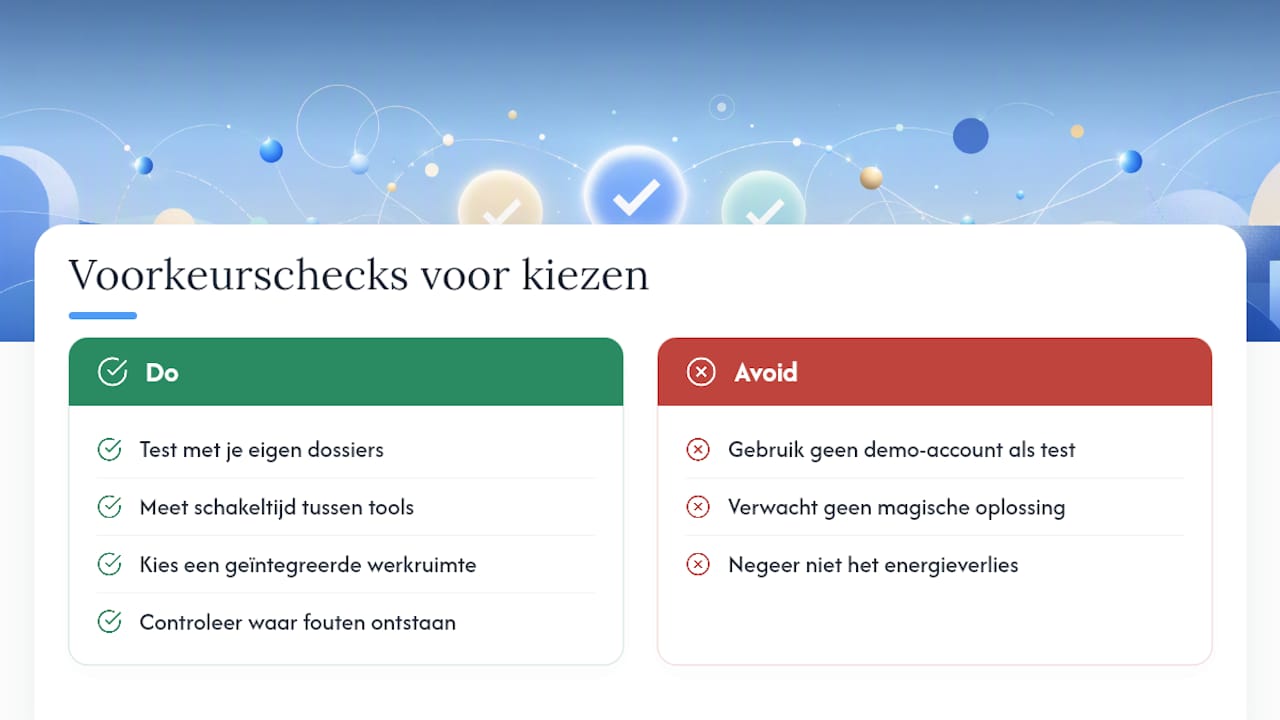
Most coaches underestimate how much time separate tools cost, not because each step is slow, but because switching between systems drains energy you would rather put into a client. An integrated workspace does not solve that magically, but it reduces the number of places where something can go wrong. So always test with your own files first, not with a demo account full of fake data.
Sources
- Privacy legislation GDPR: how to comply with the rules | Ondernemersplein
- Programme of Requirements for practice software - LVVP
- The best coaching software - iSpring
Frequently asked questions
What is the best coaching team software for small practices?
For solo coaches and small teams, an integrated platform like Exantur is often the best fit, because client management, session notes and a client portal all live in one workspace.
What should a Programme of Requirements for coaching software include?
A Programme of Requirements covers at minimum legal requirements such as a data processing agreement, functional requirements such as a client portal and session notes, and administrative requirements such as online booking and invoicing.
Does coaching software automatically make my practice GDPR-compliant?
No. Software can support GDPR-aware processing with EU hosting and a data processing agreement, but responsibility for full compliance remains with the coach.
How long does it take to switch to new coaching team software?
Allow for a trial period of about two weeks, followed by a controlled pilot with a small number of clients before you migrate the entire practice.
Is Exantur suitable for larger coaching organizations?
Yes, in addition to the core features for solo coaches, Exantur also offers user roles and team analytics for practices with multiple coaches.