
Excel alternative for coaching: why coaches are switching to practice software
Excel alternative for coaching: why coaches are switching to practice software

A specialized practice management tool replaces Excel the fastest when you want to safeguard structure, privacy and progress. Excel offers no access control, no data processing agreement and no linked session notes, while a tool like Exantur does. Three things matter most: the confidentiality of client data, records that are always accurate and a calendar that shows progress right away. Try it yourself free for fourteen days and notice the difference in your daily routine.
In short:
- Using a specialized practice management tool improves privacy, data quality and administrative efficiency compared to Excel, which offers no access control.
- Coaches with more than three separate Excel files per client risk privacy leaks and loss of overview, causing professional and ethical problems.
- Switching usually takes only a few hours spread over a week, especially when you start with a test group and clean up your data first.
- Good coaching software links calendars and facilitates client records, session notes, invoicing and offers support during migration, so you work faster and more securely.
- For small practices with little sensitive data, Excel may still suffice, but as you grow or add multiple users, the risks and inefficiencies quickly outweigh the convenience.
Table of contents
- Why Excel often falls short for client management and coaching journeys
- Selection criteria: what coaches should look for in an alternative to Excel
- Step by step from Excel to a coaching practice system
- Pros and cons of spreadsheets versus specialized coaching software
- Time and cost estimate of switching
- Comparison of prices and subscription models of popular coaching alternatives
- Support and customer service options with alternative software
- Integration options with other tools and software coaches use
- Why Exantur offers a practical alternative for coaches who want to replace Excel
- Practical tips for adoption and use
- Sources
- Frequently asked questions
Why Excel often falls short for client management and coaching journeys
Excel was made to calculate, not to store confidential client data. As soon as you share a file by email or via a shared folder, you lose track of who has seen, changed or downloaded it. Version control and unintended distribution make it difficult for coaches to meet the requirements of the GDPR, the law that governs how you may process and store personal data. An analysis of member administration in Excel shows that precisely this kind of spreadsheet use carries privacy risks, even when the intentions are good.
With Excel, hidden data sometimes lingers in formulas and pivot tables. If a client asks for their data to be deleted, you cannot always fully guarantee it, which in itself is a GDPR problem.
Recognizable problems in practice:
- Two coaches accidentally schedule the same time slot with a client because the calendars aren't linked.
- Session notes get lost after a crash or a wrongly saved version.
- An old tab with sensitive information is accidentally left in a shared file.
- A client asks to review their record and you have to manually search through dozens of tabs.
Pro tip: Check right now how many separate Excel files you have per client. If you go over three, that's a signal that you need structure, not more discipline.
These issues don't just affect your efficiency. They touch your professional ethics. A client who shares their most vulnerable stories expects that information to be safe. A spreadsheet that accidentally ends up in the wrong inbox damages that trust immediately.
Selection criteria: what coaches should look for in an alternative to Excel
Not every coaching platform is the same. You choose the best alternative with a few clear criteria in mind.
- Privacy and legal safeguards. Check whether data is stored in Europe, whether there is a data processing agreement (a contract that sets out how a supplier handles personal data) and whether access to records is limited to those who need it.
- Functionality you use daily. A good alternative bundles the client record, searchable session notes, calendar synchronization and a way to send invoices.
- Ease of use and the client journey. The best system preserves context from the first conversation to the end of a coaching journey, not just names and phone numbers. That is also the conclusion of a practical analysis of CRM choice for coaches: choose based on what the client journey needs, not on the longest feature list.
- Trial period and support at the start. Can you test without risk, and do you get help importing your existing data?
Pro tip: Make yourself a list of the five things that annoy you most about Excel right now. Test each alternative specifically against those five points, not against the full feature list the supplier promotes.
A tool that just has lots of features but doesn't follow a clear line from intake to completion will ultimately cost you more time than Excel ever did.
Step by step from Excel to a coaching practice system
A switch doesn't have to be chaotic if you break it into pieces.
- Determine which data you really need. This is called data minimization: keep only what you actually use in your coaching, and discard the rest before you move.
- Make a clean export file. Remove hidden tabs, old formulas and notes that are no longer relevant before you import anything into a new system.
- Arrange the legal side. Inform clients that their data is moving and ask for consent where needed. Check whether the new supplier offers a data processing agreement.
- Import and test with a small group. Migrate five clients first, set up your calendar links and check that session notes are properly searchable before you migrate the rest.
- Evaluate after two to four weeks. See what does and doesn't work in your new routine and adjust your process accordingly.
Digitizing scheduling and records prevents many of the errors that arise with Excel, such as double bookings and scattered notes, as an article on managing calendars with Post-its shows. Move in stages and keep a fallback route on hand, so that a stalling migration doesn't bring your practice to a halt.
Pros and cons of spreadsheets versus specialized coaching software
Excel has one big advantage: you already know it, and it costs nothing extra if you already have it through Microsoft 365. For a handful of clients and simple notes, that works just fine. But as soon as your client base grows, so do the risks and the wasted time.
Specialized coaching software costs money, that's the honest downside. In return, your record, calendar and invoicing are all in one place, with access control that Excel simply doesn't have. Session notes stay linked to the right client and coaching journey, instead of scattered across separate tabs you have to remember.
So the difference isn't about "better" or "worse" as a standalone judgment. It's about what fits the size and risk of your practice. Do you work with a few clients and never have sensitive information sitting in a shared file? Then you can carry on with Excel for a while. Do you work with ten or more ongoing coaching journeys, records with personal information and multiple coaches in your organization? Then the drawbacks of a spreadsheet outweigh the convenience it gives you now.
Time and cost estimate of switching
A switch takes less time than many coaches fear, especially if you migrate in stages. Most platforms offer a trial period during which you can test whether the tool fits your way of working without paying. Some platforms work with a free trial period of two weeks, with no costs during that trial.
For the actual migration, count on a few hours spread over a week: cleaning up your Excel file, importing client data and linking your calendar. Test this first with a small group of clients before you move your entire base, that prevents you from being stuck with a big load of errors all at once.

After the trial period, the chosen paid subscription starts automatically unless you cancel before it ends. That's important to know: set a reminder in your calendar so the trial doesn't quietly roll over into a paid subscription while you're still unsure. The real cost isn't only in the subscription, but also in the time you spend getting used to a new routine. You usually recoup that adjustment time within a few weeks, simply because you're no longer hunting for the right tab.
Comparison of prices and subscription models of popular coaching alternatives
Coaching software usually works with a monthly or annual subscription, often with a lower price per month if you pay annually. At Exantur you clearly see that structure across the five available packages.
| Package | Price per month | Price per year |
|---|---|---|
| Mini | €19 | €190 |
| Starter | €49 | €490 |
| Growth | €99 | €990 |
| Practice | €199 | €1,990 |
| Enterprise | on request | on request |
Beyond the packages, separate add-ons are available, such as an extra coach for €25 per month, 50 GB of extra storage for €29 per month, custom branding for €39 per month and agreements for €19 per month. See the full prices and packages for the current details.
When comparing subscriptions, don't just look at the price per month. Also look at what comes with a larger package: more clients, more coaches in your team, or more extensive reporting. A cheap entry-level subscription that you soon have to scale up may end up costing more than choosing the package that fits your practice right away.
Support and customer service options with alternative software
Support makes the difference between a smooth switch and weeks of frustration. With each alternative, ask concretely about three things: how quickly customer service responds, whether there is help importing your existing Excel data, and whether there is documentation where you can find answers yourself without waiting for a reply.
Smaller, specialized suppliers often work with a compact team that knows coaching practice well. That usually means more personal contact than with a generic tool built for a hundred different professions. During your trial period, simply ask customer service something once, even if you already know the answer. That way you test how quickly and how clearly they respond before you take out a subscription.
Also check whether there is help with the legal side of your switch. A supplier who helps you understand what a data processing agreement entails and why it matters saves you hassle later with your own GDPR obligations. Software does not automatically make your practice fully GDPR-compliant. That always remains your own responsibility as a coach too.
Integration options with other tools and software coaches use
A coaching tool that stands on an island creates extra work instead of saving time. So check whether an alternative connects with the tools you already use: your calendar, your video calling system and your invoicing.
Two-way calendar synchronization with Google Calendar or Outlook means that an appointment you schedule in your coaching tool automatically appears in your regular calendar and vice versa. That prevents double bookings, one of the most frequently mentioned frustrations among coaches who still work with separate systems. A connection with Zoom saves you copying and pasting meeting links for every session.
For communicating with clients between sessions, an additional tool such as the WhatsApp Assistant by SzopaLabs can be handy for automating reminders and short check-ins. And if you want to understand more about how to keep potential clients warm before they become customers, this overview of lead nurturing offers a good starting point.
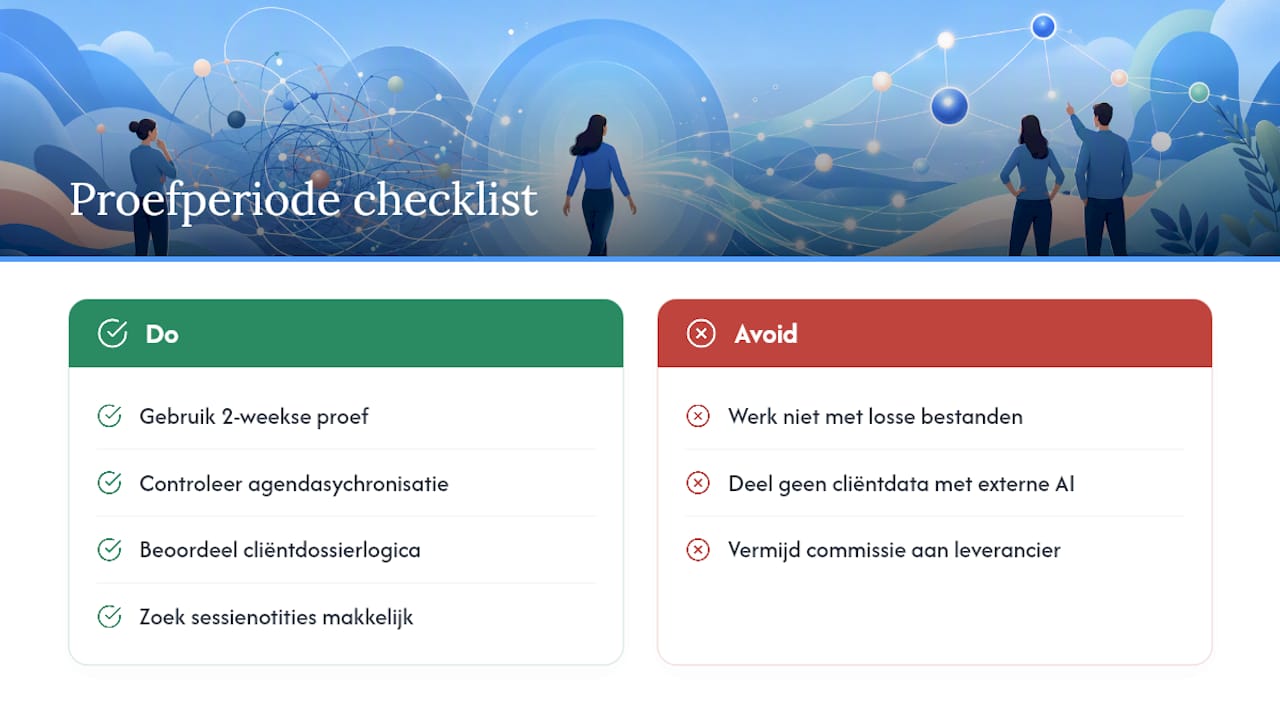
Payments are another point: check whether invoicing runs directly through your own payment account, without the supplier taking a cut of your revenue as commission.
Why Exantur offers a practical alternative for coaches who want to replace Excel
An alternative to Excel prevents a patchwork of separate files and tabs. Client records, session notes and goals sit in one place, linked to the right client and the right coaching journey, exactly as the selection criteria above indicate. You capture notes as observations, insights, breakthroughs and action points, so that before each session you immediately know where you left off.
With a good alternative, privacy and security are handled by default, for example through European hosting, a data processing agreement and limited access to records with extra security layers.
An alternative can save you the hassle of separate tools: calendars can synchronize automatically, Zoom links are added, and you can invoice through your own payment account without commission from the supplier. Some tools offer an optional AI assistant that can help draft session summaries based on your own notes, without sharing client data with the AI model.
Test it yourself via a free trial period of two weeks. During that trial, check specifically whether your calendar synchronizes properly, whether the client record feels logical, and whether the session notes are easy to find again. Look at the packages and prices or read more about Exantur as practice management software for coaches to see which package fits your practice.
Practical tips for adoption and use
Start with a small group of clients, not with your entire base at once. Standardize right away how you record notes and check-ins, so that from day one you have a fixed routine instead of figuring out anew each time how to record something.
Schedule a fixed evaluation moment after a few weeks. Ask yourself what is running smoothly and what still feels off, and adjust your process before habits set in.
You don't need to give clients a technical explanation. Just tell them that their data is stored more securely and more clearly, and that as a result sessions connect better with what was discussed last time. Most clients only want to know one thing: does my story stay confidential, and does this move our sessions forward? Coaches who hold on to Excel for too long often underestimate how quickly a growing client base makes that spreadsheet unmanageable.
— Martijn
Sources
For further reading on the topics in this article:
- The dangers of member administration in Excel: working GDPR-proof for associations - Membro BV
- Cyburg
Frequently asked questions
Is Excel suitable for small coaching practices?
For a handful of clients and simple notes, Excel can still work for a while, as long as you don't share sensitive information through unsecured files. As soon as your client base grows or you have several coaches in your practice, the risks around privacy and version control arise quickly.
What does an alternative to Excel cost on average?
At Exantur it starts at €19 per month for the Mini package, up to €199 per month for the extensive Practice package, with annual rates that work out slightly cheaper. The full prices are listed here.
How long does the switch from Excel to coaching software take?
Count on a few hours spread over a week if you first test with a small group of clients before migrating everything. Most of the time goes into cleaning up your Excel file, not into the import itself.
Can I try an alternative for free first?
Yes, Exantur offers a free trial period of 14 days with no costs during the trial. Please note: after the trial, the chosen paid subscription starts automatically unless you cancel before it ends.
Is software alone enough to be GDPR-compliant?
No, software helps you with GDPR-conscious data processing, but does not automatically make your practice fully GDPR-compliant. You remain responsible yourself for consent, retention periods and the correct handling of client data.