
Switching to a coaching platform: should you or not?
Switching to a coaching platform: should you or not?

Yes, make the switch if you support more than five active coachees and you're losing time to scattered tools, spreadsheets, and emails. Still unsure? Then look at three concrete signals: how many hours per week you spend on administration, how many apps you use to track a single coaching journey, and whether your clients occasionally have to look something up or resend it. If you recognize two out of three, then switching to a coaching platform is a rational step, not a luxury.
The most practical approach: start with a trial period at a platform built specifically for coaches, not with a general project tool. Exantur, for example, offers 14 days of free access, so you can feel for yourself whether it fits your way of working.
- More than 5 active coachees at once
- Noticeable time loss to administration each week
- Data scattered across multiple apps or documents
Key insights
Switching to a coaching platform pays off as soon as administration steals time from coaching, and a coach-first platform with GDPR protection then delivers the most value.
| Point | Details |
|---|---|
| Recognize the scaling point | From more than five active coachees, manual management often becomes unsustainable. |
| Use a checklist | Screen each platform for client portal, notes, goals, check-ins, and security. |
| Run in parallel | Work in both the old and new system simultaneously for a few weeks to prevent data loss. |
| Verify privacy | Check EU hosting, a data processing agreement, and two-factor authentication before you start. |
| Consider Exantur | Exantur is built coach-first, with a client portal and a 14-day free trial. |
Table of contents
- What switching to coaching software delivers for your practice
- When is switching to a coaching platform necessary?
- Checklist: what features must a coaching platform offer at minimum?
- Migration in practice: from decision to go-live
- Which privacy and GDPR checks matter?
- What does a coaching platform usually not replace?
- Try Exantur as a practical step toward switching
- What I often see coaches underestimate
- Sources
- Frequently asked questions
What switching to coaching software delivers for your practice
The biggest benefit is clarity. Everything that belongs to a client, from intake to the last session note, is in one place instead of scattered across emails, a calendar app, and a loose notebook. Coaching software centralizes communication, appointments, assignments, and documents, which makes progress clearer for both you and your coachee, as Boom Management describes.
Two examples make it concrete. Preparing an intake form or a DISC profile takes time in a loose Word document: looking it up, adjusting it, sending it, finding it again. In an integrated platform, you link the form directly to the right client and the right journey. Tracking assignments between sessions also becomes easier: you see in one screen who has submitted something and who hasn't, instead of searching through old emails.
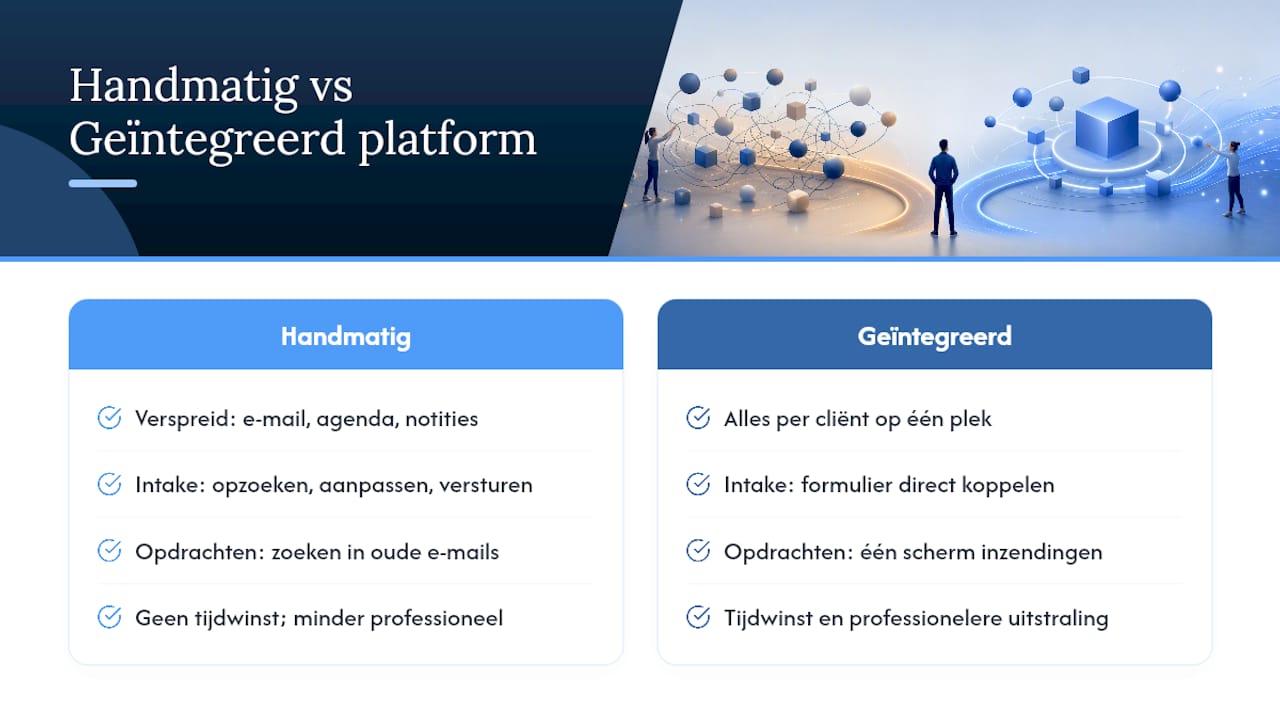
Many coaches notice above all time savings and a more professional appearance as soon as assignments, check-ins, and progress come together in one tool. Tools such as habit trackers and questionnaires also make the journey richer, not just administratively lighter, according to Coaching Klik.
Pro tip: Start by transferring your most-used intake form or questionnaire. That single document gives you an immediate sense of gain, even before you've migrated the rest.
When is switching to a coaching platform necessary?
There is no fixed revenue figure that determines when you should switch. There are, however, practical signals. As soon as you structurally support more than five active coachees, manual management with loose documents and calendars often becomes unsustainable, and specialized software helps to scale and organize processes, as research from SYS Platform shows.
Do a short, honest check: how many hours per week do you spend searching, copying, and reminding instead of coaching? Does the experience feel inconsistent for your clients, because one gets a detailed summary and the other doesn't? That is a quality cost, even though it appears nowhere on your invoice.
Do note: don't switch too early. With two or three clients, a simple system is often sufficient, and a full-fledged platform can then cost unnecessary money and take time to get used to.
- More than five active coachees at once
- Noticeable time loss or an inconsistent client experience
- Concrete growth ambition for the coming year
Checklist: what features must a coaching platform offer at minimum?
Before you make a choice, it's smart to hold platforms up against the same list. That way you compare apples with apples instead of marketing language with marketing language.
- Client portal. Your coachee must be able to view goals, assignments, and documents themselves, without you having to forward everything manually. Ask the provider: can my client also fill something in here themselves, such as a check-in?
- Searchable session notes. Observations, insights, breakthroughs, and action points must be findable, even months later. Ask: can I search old notes by topic or keyword?
- Goals and progress. You want to see at a glance where a client stands relative to the starting point. Ask: how does the platform visualize progress over time?
- Check-ins between sessions. This keeps engagement and accountability alive between two appointments. Ask: can the coachee start a check-in themselves, or do I always have to initiate it?
- Assessments. Think of a DISC profile or a Wheel of Life. Ask: are structured assessments included, or do I have to purchase them separately?
- Document management. Contracts, assignments, and reports must stay linked to the right client and the right journey.
- Security. Ask about two-factor authentication (MFA) and a data processing agreement, the contract that sets out how the provider handles client data.
Also look carefully at the trial conditions. A 14-day trial period is common and low-threshold, but check whether the subscription renews automatically after the trial and what the cancellation period is. Also ask whether you can start without payment details, or whether they're needed straight away.
Migration in practice: from decision to go-live
A migration rarely fails because of the technology. It fails because of haste and unclear communication. This sequence prevents most problems.
- Decide and start a trial. Choose a platform based on the checklist above and start a trial period. Do this yourself, not via an assistant, so you assess the feel correctly.
- Make a data inventory. List which client data, notes, documents, and forms you have, and where they currently reside.
- Export from your old systems. Retrieve contact details, notes, and documents from your current tools before you start entering them.
- Run in parallel. Work in both systems simultaneously for two to four weeks for new appointments, while you calmly transfer historical data.
- Training and communication to coachees. Explain why you're switching and what changes for them, for example a new portal to log in to.
- Go-live and aftercare. Only shut down the old system completely once all active journeys have been transferred and checked.
Who carries out these steps depends on your practice. If you work solo, you go through everything yourself; if you have an assistant, divide up the exporting and entering, but keep communication to clients in your own hands.
Pro tip: During the parallel run, schedule two review moments, for example after week one and after week three. Then check whether notes, assignments, and check-ins have been transferred correctly, before you let go of the old system.
Which privacy and GDPR checks matter?
The General Data Protection Regulation (GDPR) requires you to handle client data carefully, especially sensitive coaching notes. Choosing a platform with an explicit GDPR focus and hosting within the EU is therefore not an extra wish, but a basic condition.
Concretely check four things: where the data is hosted, whether a data processing agreement is available that you can conclude with the provider, whether the platform supports two-factor authentication (MFA) for logging in, and how backups and role management are arranged if you work with an assistant.
A platform with EU hosting and a clear data processing agreement is one of the strongest trust signals a coach can check before client data moves anywhere else.
Note: using software does not automatically make your practice fully GDPR-compliant. You remain responsible yourself for handling data carefully, even with the right tools in the background. Take a look, for example, at Exantur's security measures as an example of what you may expect.
What does a coaching platform usually not replace?
A coaching platform is not an all-in-one solution for your entire business operation. Don't expect it to take over your bookkeeping, payments, contract signing, or video calling. Many platforms, including Exantur, deliberately focus on coaching itself: client relationships, documentation, goals, and follow-up, not on appointment scheduling or invoicing.
So continue using separate tools for:
- Bookkeeping and invoicing
- Collecting payments
- Digital signing of contracts
- Video calling for remote sessions
Connect these tools where possible, but accept that a manual link is often sufficient. That way you avoid unnecessary tool stacking without having to search for one system that does everything anyway.
Try Exantur as a practical step toward switching
Exantur is built for coaches, not repurposed from a general CRM. That coach-first design means that session preparation, searchable notes, and follow-up between sessions fit how a coaching journey actually unfolds, as Exantur itself describes. Your clients get their own portal in which they view goals, assignments, and check-ins, and you see which appointments are outstanding and where extra attention is needed.
Data is hosted within the EU, with a data processing agreement and two-factor authentication as standard parts of the security. Exantur offers a free 14-day trial period; after it ends, the chosen subscription starts automatically, unless you cancel before the end. Payment details are required at the start.
Want to first know how much time switching will concretely deliver? Take the coaching admin time audit or go directly to the best practice management software for coaches and start your trial.
What I often see coaches underestimate
Coaches usually don't underestimate the technology, but the calm that clarity provides. Once you see which client needs attention without searching through five documents, you coach differently: more focused, less distracted by administration. You only notice that shift after the migration, not before.

Sources
If you want to go deeper into one topic, use targeted sources instead of reading everything again.
- Five benefits of why Coaching Software is a must for your business - Boom Management
- Why use coaching software as a coach? | SYS Platform
- 5 reasons why Coaching Software is a must for your business
Frequently asked questions
When should I switch to a coaching platform?
Switching makes sense from around five active coachees, or as soon as you notice you're losing time to administration and scattered tools.
Does switching to coaching software take a lot of time?
Count on a few weeks if you run in parallel with your old system, calmly transferring historical data while new appointments already run in the new platform.
Is a coaching platform automatically GDPR-compliant?
No, using software does not automatically make your practice fully GDPR-compliant. You remain responsible yourself, even though a platform helps with EU hosting and a data processing agreement.
Does a coaching platform replace my bookkeeping or video calling?
Usually not. Platforms like Exantur deliberately focus on coaching, client relationships, and documentation, not on invoicing, payments, or video hosting.
What does a trial period at Exantur cost?
Exantur offers 14 days of free access. Payment details are required at the start, and after the trial the chosen subscription starts automatically unless you cancel beforehand.