
Best coach dashboard for privacy and practice management
Best coach dashboard for privacy and practice management

For professional coaches, an integrated coaching dashboard is the most effective way to organize sessions, notes, and progress. Such a dashboard works best when it combines three things: structured notes and goals in one place, EU hosting with a data processing agreement for your privacy obligations, and practice administration such as scheduling and invoicing. There are solutions that offer this for coaches who take this seriously. Further on, you'll read exactly which features make a real difference and what to look out for during the trial period.
In short:
- A coaching dashboard should combine structured notes, goals, and progress measurements, and be privacy-secured and easy to integrate with existing tools.
- Using it saves time in preparation and reporting, while data visualization makes progress concrete and demonstrable for clients.
- When comparing, you should pay attention to EU hosting, data processing agreements, integration options, and ease of use, especially for methods such as GROW or DISC.
- A successful implementation starts with demos, trial periods, and a small-scale pilot until the workflow runs smoothly and reports are usable.
- Exantur offers a fully integrated coaching dashboard with EU hosting and privacy protection, suitable for practice growth, and can be tried for free via a 14-day trial period.
Table of contents
- What is a coaching dashboard and which features does it need?
- What does a dashboard concretely deliver for coach and client?
- What should you look out for when comparing coach dashboards?
- How do you successfully implement a coaching dashboard?
- How does Exantur match these selection criteria?
- When is it worth switching to a dashboard?
- Start a trial period with Exantur today
- Sources
- Frequently asked questions
What is a coaching dashboard and which features does it need?
A coaching dashboard is a digital workspace where your entire coaching process comes together: from intake to scheduling, from session notes to progress measurement. It replaces the loose collection of a calendar app, a notebook, a spreadsheet for goals, and a separate invoicing tool. Such a coaching platform acts as the digital nerve center of your practice: everything you now keep scattered is in one place and searchable.
A good dashboard contains at least these components:
- Structured session notes, in which you can record observations, insights, breakthroughs, and action points separately instead of dumping everything into one long text
- Goals and progress, so you can see per client where someone stands relative to the starting point
- A client portal, where the coachee views goals themselves, reviews assignments, and completes check-ins
- Check-ins between sessions, to maintain accountability without you having to chase after everyone yourself
- Scheduling and booking, including automatic reminders for sessions
- Invoicing, linked to your own payment account
The difference between a generic tool and a dashboard genuinely built for coaching lies in the details. A spreadsheet doesn't show breakthroughs from a session three months ago. A calendar app doesn't link a session note to a specific coaching program. Whoever brings these components together not only saves time but also gains an overview that simply can't emerge from separate tools.
What does a dashboard concretely deliver for coach and client?
You notice the biggest benefit not in the session itself, but afterward and beforehand. Preparing sessions takes less time if you can reread the previous notes and action points in two minutes, instead of searching through emails or notes.
For clients, think of HR departments or organizations that purchase coaching, proof of progress is often just as important as the coaching itself. Data visualization makes progress and trends visible, allowing coaches to have more concrete conversations and provide demonstrable evidence to clients, without the human side of coaching disappearing.
Practical situations where this works:
- Individual programs: you show a client at a glance the progress since the first session
- Team programs: you compare progress between participants without keeping separate Excel files
- Training providers: you report to a client about an entire group of trainees at once
Best practices in coaching software show that dashboards often display KPIs such as completion rates and average scores over time, exactly the kind of figures a client wants to see before a contract is renewed.
What should you look out for when comparing coach dashboards?
When comparing coach dashboards, it's not about the prettiest interface, but about a few hard questions. Whoever skips these questions only discovers the shortcomings once a client file is already locked into a system that doesn't do what you need.
Privacy and GDPR. The GDPR (General Data Protection Regulation) obliges you as a coach to handle clients' personal data carefully. Always ask where the data is stored (EU hosting makes it easier to comply with European rules), whether a data processing agreement is available, and who exactly has access to client files.
Integrations. Does the dashboard work together with your calendar (Google Calendar, Outlook) and with the video calling platform you already use? A system that doesn't sync means double work.
Ease of use and methods. Can you work with templates for well-known methods such as the GROW model, Wheel of Life, or DISC, or do you have to build everything yourself?
Concrete questions for a demo:
- How do I export my client data if I ever want to switch?
- Who within your organization can access my client data?
- Is there a data processing agreement and where is the data hosted?
- What does an extra coach or extra storage space cost as my practice grows?
- How long does a trial period last and what happens automatically afterward?
Pro tip: During the demo, ask to walk through a fictional client's file completely, from intake to reporting. This way you'll see within ten minutes whether the system fits how you work, instead of relying on a sales pitch.
How do you successfully implement a coaching dashboard?
Implementing a dashboard works best step by step, not all at once for your entire practice.
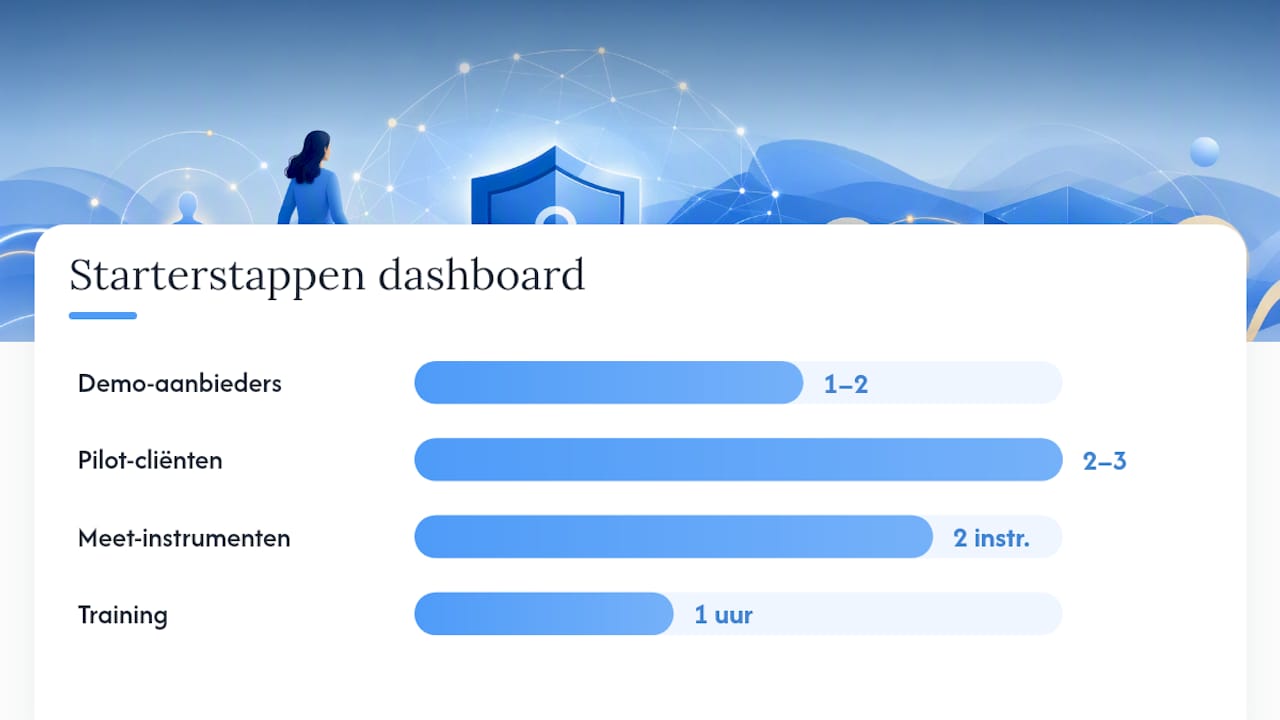
- Request a demo from one or two providers and test the most important features yourself.
- Start a trial period and enter your own intake form and an ongoing program.
- Run a pilot with two or three clients before you transfer everyone.
- Roll out fully once the pilot feels good and your workflow runs smoothly.
During the pilot, you set up your intake forms, structure session notes into fixed categories (observation, insight, breakthrough, action point), and set goals and check-ins for each client. Reports for clients are best made at the program level: share progress and trends, not every detail from a session note.
Start small: choose two measurement instruments to begin with and only expand once you've collected a few months of data. This approach lowers the onboarding time and delivers usable insights faster than trying to measure everything at once. Plan a short one-hour training for yourself, use the templates the vendor provides, and hold off on more complex reports until you've got the basic rhythm down.
How does Exantur match these selection criteria?
Exantur is built around the coaching process itself, not as an adapted CRM (customer relationship management system) made suitable for coaches after the fact. You notice that difference immediately in how the features connect to each other.
- Structured session notes: observations, insights, breakthroughs, and action points remain searchable and linked to the right program, see the session notes software for coaches.
- Goals and progress: you track coaching goals and scores per client, including accountability and check-ins between sessions.
- Assessments: DISC profiles and Wheel of Life are built in, as are intake forms, documents, and assignments that remain linked to the right client.
- Practice administration: online booking with automatic reminders, calendar synchronization with Google Calendar and Outlook, Zoom integration, and invoicing via your own Stripe account, without Exantur taking commission on it.
- Privacy: hosting in Frankfurt within the EU, a data processing agreement, and organization isolation so client data stays separated. More details are available at secure coaching software.
Whoever wants to try this can usually make use of a free trial period, after which the subscription starts if it's not cancelled.
When is it worth switching to a dashboard?
Switching is worth it as soon as you notice that administration takes more time than the sessions themselves, or as soon as a client asks for hard figures that you can't currently deliver quickly. Then don't start with your entire practice, but with a pilot of two or three clients. Afterward, measure two things: how much time you save and whether clients find the new way of working pleasant. Those two signals tell you more than any feature list.
— Martijn
Start a trial period with Exantur today
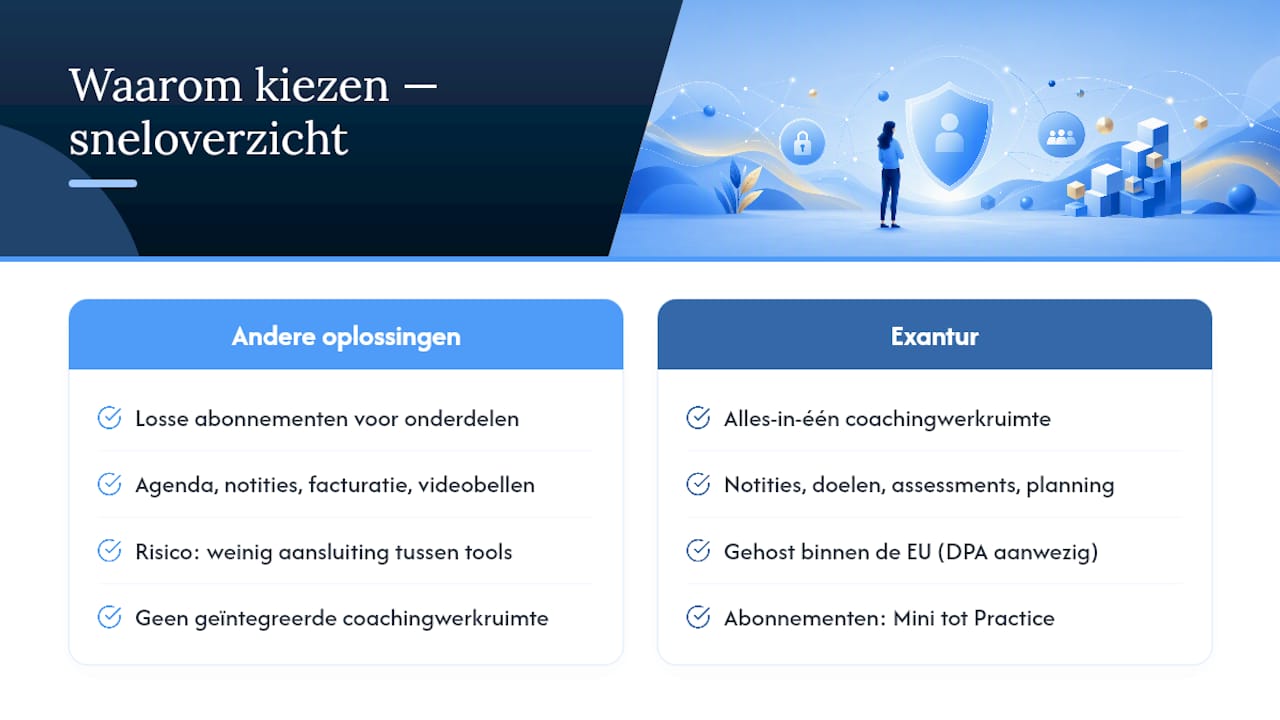
Other solutions often ask you to combine separate subscriptions for calendar, notes, invoicing, and video calling, with the risk that nothing connects well. Exantur is built around the coaching process itself: notes, goals, assessments, and scheduling are already in one workspace, hosted within the EU with a data processing agreement for your privacy obligations. Check out the subscriptions on the pricing page, from Mini to Practice, and start the free 14-day trial period at no cost. Still unsure whether it fits your practice? On the page about coaching software for the Netherlands, you can read how Exantur precisely matches a coach's daily practice. Sign up, enter an ongoing program, and experience within two weeks whether the rhythm fits.
Sources
Want to dive deeper into coaching methodology itself? Five commonly used techniques, including the GROW model, active listening, and accountability, are explained at Coniche. For custom reporting dashboards outside of coaching, Codentix provides background on dashboard development. Want to first calculate what software costs you per year? Use Exantur's stack calculator.
- What does a career coach cost per hour in the Netherlands? (2026 Update)
- What role does data analysis play in modern career coaching? | Vista Nova
- Best practices in the field of coaching | Easy LMS
Frequently asked questions
What does a good coach charge per hour?
Average hourly rates for coaches in the Netherlands usually range between €75 and €200, depending on experience and specialization. Starting coaches typically charge 50 to 80 euros, experienced coaches 130 to 200 euros, and executive coaches often more.
What are the 5 most commonly used coaching techniques?
Five commonly used techniques are the GROW model, active listening, powerful questions, visualization, and accountability. A dashboard supports these techniques by linking templates and progress tracking to each method.
What does Exantur cost?
Exantur works with subscriptions ranging from the Mini package at 19 euros per month to the Practice package at 199 euros per month, alongside a separate Enterprise option available on request. Current prices and all options are listed on the pricing page.
How do I choose the best coach dashboard for my specialization?
First look at which assessments and methods you use, such as DISC or the Wheel of Life, and check whether the dashboard supports these by default. Then pay attention to privacy terms, integrations with your calendar and video platform, and whether the client portal suits how independently your clients want to work.
Who are the best coaches in the Netherlands?
That depends heavily on specialization, think of career coaching, executive coaching, or team coaching, and on a personal connection with a client. A national ranking of "best coaches" does not exist in a way that is relevant for every situation; it is better to look at certification, experience, and references within the specific field.