
Folder structure for coaching: how to build a clear overview
Folder structure for coaching: how to build a clear overview

A good folder structure for coaching has a limited number of main folders and a shallow depth to keep everything clear. Set up fixed subfolders per client for intake, sessions, assignments and archiving. In addition, schedule a short tidy-up round regularly and an archiving moment each quarter. With this foundation you can find any document within seconds, even after years.
In short:
- A maximum structure of eight main folders with three levels ensures quick and clear access to client data and documents.
- Setting up an inventory and using a temporary folder prevents old clutter from complicating your new folder structure.
- Consistent file naming with dates and versions speeds up searching and maintains a clear overview, especially in long-running programmes.
- A structure that follows the coaching process, such as intake, assessments and reflection moments, creates a living file that grows along with the client.
- Digital practice software, such as Exantur, automates and simplifies folder and file management, so time and search costs disappear.
Table of contents
- Step 1: clean up and start with an inventory
- Step 2: choose main folders and limit the depth
- Step 3: consistent file naming and version control
- Step 4: align the structure with the coaching process
- Step 5: accessibility and secure storage
- Step 6: maintenance routine and archiving
- Putting it into practice: how a coaching practice uses this
- Adapting your folder structure to different coaching styles
- Consistency gives you time back
- Exantur as a tool for your client folders and session notes
- Sources
- Frequently asked questions
Step 1: clean up and start with an inventory
Before you build a new structure, first map out what you already have. Most coaches then discover that client files are scattered across email, an old cloud folder and sometimes even the computer itself. Cleaning that up takes an afternoon, but afterwards it saves you months of searching.
Complete the inventory in three steps:
- Take stock per client of which documents exist: intake form, agreement, session notes, invoices and any assignments. Write it down on paper if you have to before you start moving things.
- Decide what to keep, archive or delete. Not everything needs to be actively in your main folder. Take into account the retention obligation for invoices and administration, and the consent a client gave for storing sensitive notes.
- Create a temporary “migration” folder and move only the files you really still use to the new layout. Simply leave behind old drafts and duplicate versions. This approach, with one temporary working folder for the transition, prevents you from dragging the clutter of the old structure into the new one, as is also advised in practical guides on digital folder structures.
Take your time with this step. A structure you build on a messy foundation stays messy, no matter how nice the folder names are.
Step 2: choose main folders and limit the depth
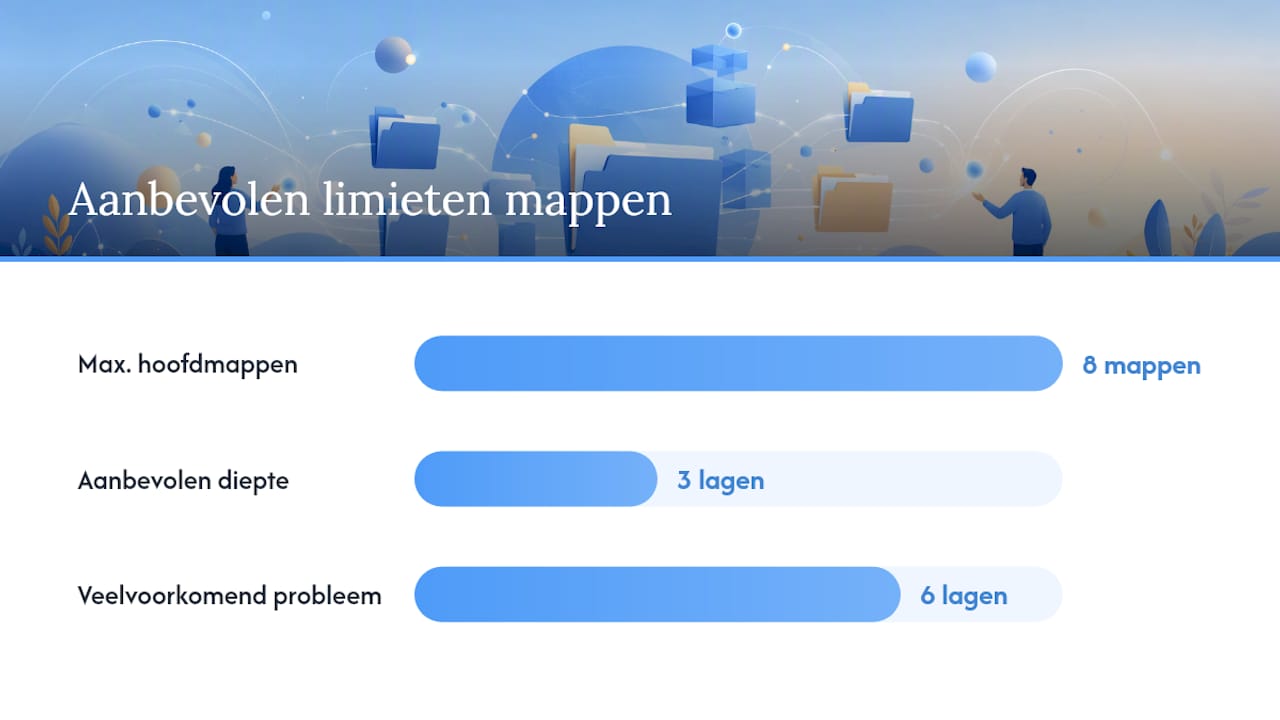
An effective folder structure stands or falls with discipline at the top level. Research into digital archiving shows that a maximum of 8 main folders with no more than 3 levels of depth noticeably improves findability, because files then never sink too deep into subfolder after subfolder. That is exactly the problem at many coaching practices: after a few years a session note is sometimes buried six levels deep, and you type into the search bar faster than you click your way there.
For coaches, the following layout of main folders works proven well:
- Clients – one subfolder per client, the core of your practice.
- Programme templates – your fixed setup for an individual programme, a group programme or a specific programme.
- Session notes (general) – templates and examples, separate from individual client files.
- Tools & assessments – templates for, for example, a DISC profile or a Wheel of Life.
- Administration – contracts, invoices and agreements.
- Inspiration & professional development – articles, course material and your own notes.
In individual coaching, each client gets their own folder under “Clients”, with subfolders inside for intake, sessions and documents. In group coaching it works slightly differently: you create one folder per group or cohort, with a subfolder per participant inside for personal notes. This keeps the distinction between group material and individual progress clear, without having to go deeper than three levels.
Step 3: consistent file naming and version control
A strong folder layout is half the work. The other half is how you name files within those folders. Without fixed rules you end up with files like “notes final new version2”, and that makes no one happy.
Use a fixed format: first the date in the order year, month, day (YYYY-MM-DD), then a short description, and possibly a version number. This chronological order ensures files automatically sort by date in every folder, which considerably speeds up finding documents.
A few examples you can adopt straight away:
2026-03-04_intakeform_janssen.pdf2026-03-18_sessionnote_janssen_v1.docx2026-06-30_finalreport_janssen_final.pdf
For version control there is a simple rule: while you are still working on a document, use V1, V2, and so on. As soon as a version is final, add “final” and move older versions to an “archive” subfolder within the client file.
Pro tip: Put a short, recognisable keyword early in the file name, for example “intake” or “action plan”. Most search functions weigh the first words more heavily, so you find the document faster than when that word appears only at the end.
Step 4: align the structure with the coaching process
A folder structure only really works when it follows the coaching process instead of imposing an arbitrary layout. A coaching file is not a filing cabinet, it is a working document that grows along with your client's progress. Guidelines for coaching files therefore recommend sections for the current situation, goals, an action log and reflection moments, exactly the phases a programme goes through.
Build each client file with this fixed structure:
- Intake – the intake form, first conversation notes and the agreement.
- Assessments – completed tools such as a DISC profile or Wheel of Life, with date.
- Session notes – chronologically per session, with observations, insights and breakthroughs.
- Action plan – ongoing actions and agreements between sessions.
- Reflection – short evaluations, interim or at the end of the programme.
- Completion – final report, last invoices and any follow-up appointments.
During a session this works simply in practice: you open the client file, briefly check the action plan from the previous time, and finish with a new note in the session notes subfolder. This keeps the folder a living document instead of a collection of loose files, and that is exactly where a good structure makes the difference between searching and getting started right away.
Step 5: accessibility and secure storage
Where you store your files determines how secure and accessible your practice is. A loose collection of folders on your own computer works fine for a handful of clients, but becomes vulnerable as soon as you travel, work with an assistant, or lose your laptop. Secure cloud storage solves that, provided you pay attention to a few practical points: who has access, is there a password with an extra security step (MFA, a second check alongside your password), and where are the servers located.
Access is best arranged per role. You as the coach see everything, any assistant only administration, and a client exclusively their own file. This prevents sensitive notes from one client from being visible to another.
For backups, simple rules of thumb apply:
- Choose storage that automatically keeps a copy, so that a mistake never immediately makes files disappear.
- Test once a year whether you can actually retrieve an old file.
- Consider specialised practice software as soon as loose folders and spreadsheets are no longer manageable, especially if you support several clients at once.
Step 6: maintenance routine and archiving
The best folder structure dilutes without maintenance. So build in a fixed rhythm: a short tidy-up round each week, a more thorough check each quarter and an annual archiving moment. That regular maintenance prevents a file from becoming unfindable and keeps your administration up to date, exactly as recommended in guidelines for coaching files.
Follow this order when completing a programme:
- Weekly: drag loose files from your downloads or email straight to the right client file.
- Quarterly: review active files and move completed programmes to an archive folder.
- On completing a programme: archive the entire file, including contract, final report, invoices and the consent the client gave for storing data.
- Annually: check whether old archives still comply with your retention periods, and delete what is no longer needed.
Archiving a file does not mean throwing it away. It goes to a separate archive folder outside your active client list, so that your main folder stays clear while the data still remains available for as long as your retention obligation requires.
Putting it into practice: how a coaching practice uses this
A dedicated practice management tool can support the structure described above without you having to manage dozens of folders yourself. Exantur is an example of this: it is built specifically for solo coaches and small coaching practices, with a dedicated workspace per client instead of loose folders on a drive.
In practice this comes down to:
- Client management in which every programme, every session and every document stays automatically linked to the right client.
- Searchable session notes with observations, insights, breakthroughs and action points, instead of loose Word files.
- Assessments such as DISC and Wheel of Life that land directly in the client file, not in a separate folder you have to maintain on the side.
- One workspace in which documents, assignments and progress stay visible, so you never again have to search for “where was that action plan again”.
In terms of privacy and security, Exantur states EU hosting in Frankfurt and works with GDPR-conscious measures. Do note: software alone does not automatically make your practice fully GDPR-compliant; that also remains your own responsibility as a coach.
Adapting your folder structure to different coaching styles
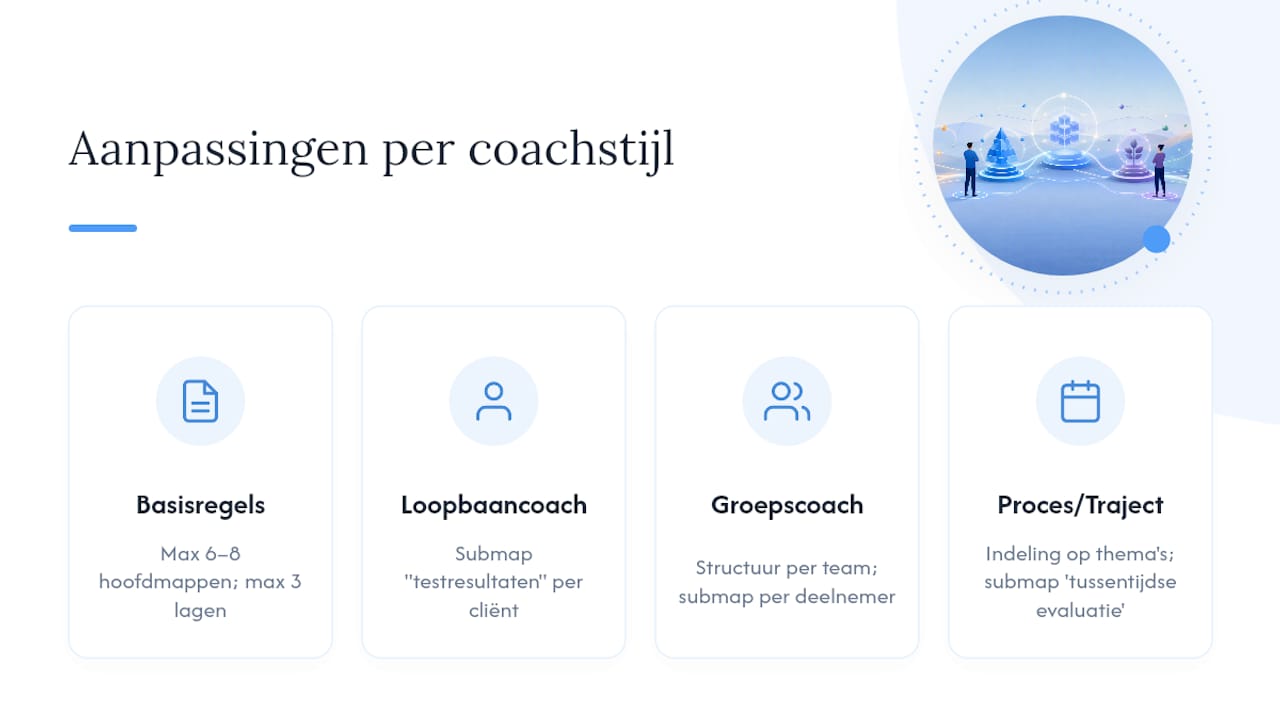
Not every coach works the same way, and your folder structure may well reflect that. A career coach who mainly works with assessments and CVs benefits from a separate subfolder for test results within each client file. A team coach who works with groups, on the other hand, benefits more from a structure per team or cohort with a subfolder per participant inside.
If you work more intuitively and process-oriented, a layout based on themes or life domains often fits better than a strict step-by-step plan.
The starting point remains the same, regardless of your style: stick to a maximum of 6 to 8 main folders and no more than 3 levels of depth, and only adapt the subfolders within a client file to your way of working. Group coaches, for example, add a shared folder for group material alongside the individual files. Coaches who work with long-running programmes sometimes add an extra “interim evaluation” subfolder. As long as you respect the basic rules of number and depth, you can colour in the layout as you see fit without losing your overview.
Consistency gives you time back
The coaches who benefit most from a clear folder structure are not the ones with the nicest system, but the ones who actually keep it up. A structure that looks perfect but is never maintained is worth less than a simple system you faithfully apply every week.
Don't start by restructuring your entire client base in one weekend. Choose one file as a trial, build out the structure there completely, and only then apply it to the rest. This way you quickly discover what does and does not work for your way of working. For working out client files and session notes, you will find concrete examples in the guide on organising coaching clients.
— Martijn
Exantur as a tool for your client folders and session notes
Loose folders and spreadsheets work until your practice grows. From that point on, keeping loose files organised takes more time than the sessions themselves. Exantur replaces that loose folder structure with an integrated workspace in which each client file automatically follows the structure you read about above: intake, session notes, assignments and action plans stay linked to the right programme, without you having to create and maintain subfolders yourself.
You record session notes as searchable observations, insights and action points, instead of loose documents you have to organise afterwards. Assessments such as DISC and Wheel of Life sit directly with the right client, and your client gets their own portal to view goals and progress.
On the page about the best practice management software for coaches, see how Exantur fills this in in practice, and start the free 14-day trial to test it yourself with one of your own client files.
Sources
The recommendations in this article are based on practical guidelines for digital archiving and coach-specific folder layouts. For the number of main folders and the maximum depth, see the guide on smart folder structures. For building a coaching file with sections for goals, action log and reflection, see the example of a complete coaching file. For factual product information about structured session notes and client management, see the page on coaching programme software.
- Setting up a smart folder structure for digital administration - Boekhoudspot
- Discover the complete coaching file for your practice
Frequently asked questions
What is a good folder structure for coaching?
A good folder structure has no more than 6 to 8 main folders and no more than 3 levels of depth, with fixed subfolders per client for intake, sessions, assignments and archive. This setup keeps documents accessible within two or three clicks.
What is the 70/30 rule in coaching?
It has no direct impact on how you organise your files.
What are the 7 steps of coaching?
Definitions of coaching steps differ by method and training. A commonly used sequence includes introduction, intake, setting goals, drawing up an action plan, execution, reflection and completion, which is reflected directly in the subfolders of a client file.
How much does one-on-one coaching cost?
The price of individual coaching varies greatly by coach, experience and region, and often depends on specialisation and the length of the programme. This article does not give a fixed rate because it varies too much from practice to practice.
Can software like Exantur replace my folder structure?
Yes, a workspace like Exantur automatically links client files, session notes and assessments to the right programme, so you no longer need to maintain separate folders for the same information.