
Keep for at least six months: an audit trail for solo coaches and small practices
Keep for at least six months: an audit trail for solo coaches and small practices

An audit trail in coaching software is the logbook in which every action on client data is recorded: who did something, when, and exactly what changed. For you as a coach, that isn't a technical detail but a piece of evidence. When a client asks a question, when there is a dispute, or in the event of a data breach, you can demonstrate what happened. Professional coaching software gives deliberate attention to this, with privacy as the starting point.
In short:
- An audit trail in coaching software records who performed actions, when, and on which client data, with the key fields being: user, timestamp, type of action and object involved.
- Access to audit logs should stay limited to you and possibly a colleague, with MFA and immutability, so that evidentiary value and privacy remain guaranteed.
- Keep logs for at least six months, unless you have a valid reason to keep them longer, and record that reason in writing for legal clarity.
- Check whether your software offers features such as per-client filters, export options and restrictions on informational access, and review the retention periods and security settings every six months.
- A well-maintained audit log not only provides legal certainty, but also strengthens client trust by handling data transparently and carefully.
Table of contents
- What belongs in an audit log for coaching software?
- How do you keep audit logs secure and accessible to the right people?
- How long should you keep audit logs?
- Practical checklist: are you using your audit logs well?
- What an audit log means for your trust as a coach
- How Exantur helps you with audit logs and GDPR-conscious working
- Sources
- Frequently asked questions
What belongs in an audit log for coaching software?
An audit log is only useful if it records the right things. Too few fields and you can't prove anything. Too many and you drown in noise without ever doing anything with it. Audit trails typically record who did something, what happened, when, and which data it concerned.
For coaching software, in practice this comes down to these fields:
- User and role: who performed the action, and did that person have access to that file as a coach, assistant or client?
- Timestamp: exact date and time of the action, so you can reconstruct a timeline.
- Type of action: creating, viewing, modifying or deleting a piece of data.
- Object involved: which client file, which session note or which document it concerns.
- Old and new value: what was there before the change, and what is there now.
- Result: whether the action succeeded or was blocked, for example by an error message.
- Context: whether the action happened through the regular screens or via an integration with another system.
- Export or download: whether a file with client data was downloaded, and by whom.
Not every field is equally important. You should always be able to trace a change to an intake form, including the old and new value. For simple read actions, such as opening a session note, extensive logging is often unnecessary. Only for highly sensitive data, such as medical information in an assessment, is it worthwhile to also record read actions.
Pro tip: Ask a software provider concretely which fields are logged per action. "We log everything" says nothing; a list of fields says everything.
How do you keep audit logs secure and accessible to the right people?
An audit log contains names, timestamps and the content of changes. That quickly makes the log itself a collection of personal data, and therefore something you must protect just as you protect your client files. Log data falls under the same privacy rules as the data it describes.
In practice, that means three things:
- Limited access: only you, or possibly a fellow coach with a clear role, can view logs. Not every employee needs this.
- MFA (multi-factor authentication): an extra login step alongside your password, for example a code on your phone, so that a stolen password alone isn't enough to reach the logs.
- Immutability: a good audit log cannot be altered or deleted afterwards, not even by you as administrator. That is precisely why a log has evidentiary value. A logbook you can rewrite yourself proves nothing.
In addition, it helps if your software provider hosts within the European Union and enters into a data processing agreement with you. That document sets out who is responsible for what when it comes to client data. BIO guidelines for logging also emphasise that logs must be reviewed periodically, not just stored away and forgotten.
A twice-yearly look at your logs, even if you notice nothing unusual, is already enough to spot whether something deviates.
How long should you keep audit logs?
The GDPR works with two simple principles: you keep data only as long as you have a clear purpose, and no longer than necessary. That applies to logs too. Keeping them indefinitely is not extra security, it is actually an extra risk, because more stored data means more to protect.
In practice, this step-by-step plan works well:
- Determine your purpose first: do you want to be able to investigate incidents, substantiate disputes, or both?
- Choose a base term: in practice at least six months is often used as a minimum, so you have enough time to detect a data breach or irregularity.
- Only extend with a reason: keeping them longer is allowed, but only if you can explain why, for example because of a long-running engagement or an ongoing dispute.
- Record your choice: write down in a short document which term you use and why. That is your evidence towards a client or regulator that you have deliberately considered this.
Pro tip: Don't set your retention period to "forever" because that feels safer. A short, well-substantiated term is legally stronger than a long term without a reason.
Practical checklist: are you using your audit logs well?
Most coaches only think about their audit log the moment something goes wrong. That is exactly too late. Instead, go through these points now:
- Can you filter per client? You should be able to quickly see what happened in one specific file, without scrolling through all the logs of your entire practice.
- Can you export? In case of a dispute or a client request, you must be able to provide an overview, ideally without unnecessary data from other clients in it.
- Who has access to the logs? Check whether this really is limited to you or a designated colleague.
- Are the retention settings correct? Check whether your retention period matches what you have agreed and documented.
- Do you have a data processing agreement with your provider? Without this document, the legal basis for how your provider handles client data is missing.
It is best to review every six months, or immediately after any incident. If you work with a colleague, assign one person who is responsible for this check, even if that is simply yourself.
In case of suspicious access, for example a login from an unknown device or changes you don't recognise, follow this step-by-step plan: immediately block the account involved, collect the relevant logs as evidence, and report the incident to your provider. In case of a suspected data breach involving personal data, you must report it within 72 hours to the Dutch Data Protection Authority.
What an audit log means for your trust as a coach
An audit log feels like bureaucracy at first. Only when something goes wrong do you see what it is really for. A client who asks why an action point was changed, or doubts whether a note is correct, can get an immediate answer if your logbook is in order. Without that log you are empty-handed and have to rely on your memory.
That is more than a legal safety net. It also shows that you handle carefully what a client shares with you, and that carries weight in a coaching relationship where trust is at the core. A practice that can show who accessed which file and when radiates something no marketing copy can replace: control over your own work.
Some coaching software is built with GDPR-conscious hosting within the European Union and features that support coaches in careful data management. That doesn't mean you never have to think about privacy again, only that the foundation is solid.
— Martijn
How Exantur helps you with audit logs and GDPR-conscious working
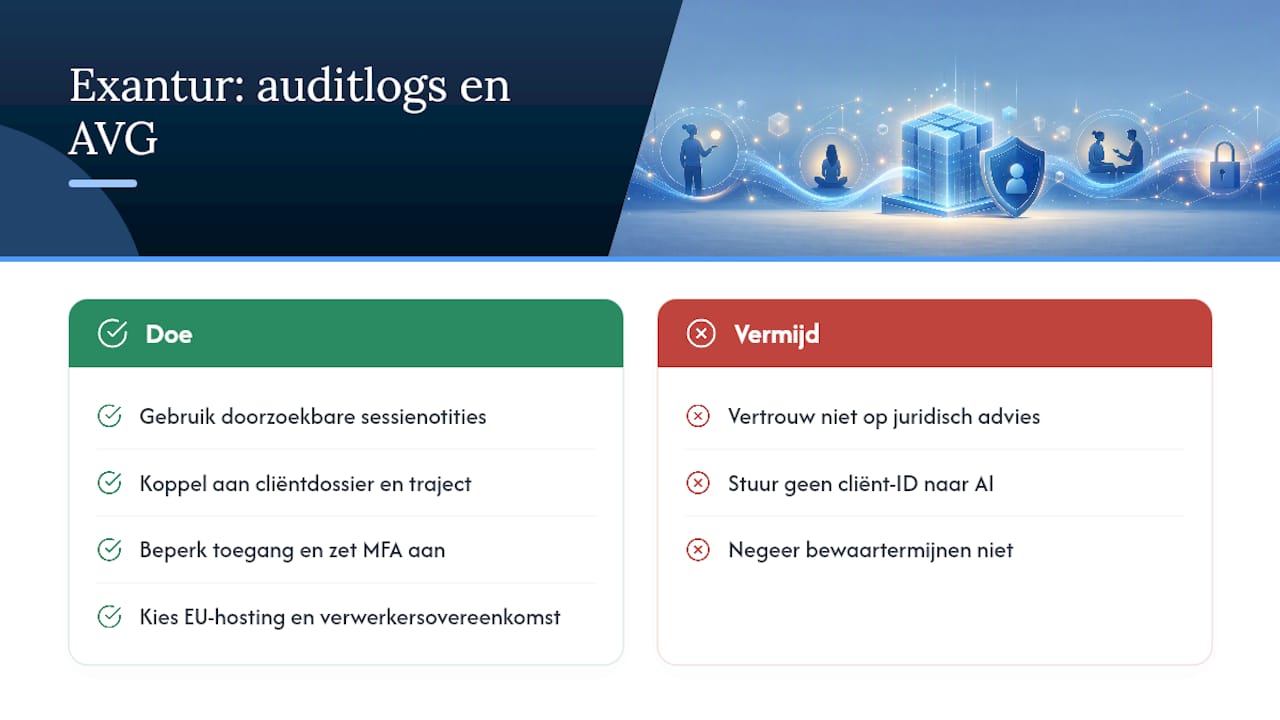
Besides all the choices you have to make yourself about access and retention periods, it helps if your software already handles this well. Certain software for coaches offers searchable session notes, linked to client files and engagements, with limited access rights and MFA as standard security. Data is often hosted within the European Union, and a data processing agreement is usually available to make responsibilities clear.
Some software offers the option to have notes summarised or prepared with an AI assistant, without client-identifying data going to the model. Take a look at the security features and the setup for client management to see how this works in practice.
Please note: software such as Exantur supports you in GDPR-conscious processing, but does not replace legal advice. When in doubt about reporting obligations or liability, always consult an expert.
Want to experience for yourself how this works in your own practice? Start the free 14-day trial and see how your files, notes and access stay organised in one place.
Sources
- What is an Audit Trail? - Explanation & Meaning | Refront
- Log data within privacy and security policy - PONT | Data&Privacy
Frequently asked questions
What exactly is an audit trail in coaching software?
An audit trail is a chronological logbook that records who performed an action, when it happened and exactly what changed in a client file or note.
Do I need to keep an audit log as a solo coach?
Yes, as a solo coach you also work with clients' personal data. An audit log helps you with accountability, disputes and investigating a possible data breach.
How long should I keep logs?
There is no legally fixed term, but in practice at least six months is often used as a baseline. Keeping them longer must be justified with a concrete purpose.
Who may view my audit logs?
Only you as the coach, or a designated colleague with a clear role, should have access. Limited access and MFA should be standard here.
What do I do if I discover suspicious access to client data?
Immediately block the account involved, collect the relevant logs as evidence and report the incident to your software provider. In case of a suspected data breach, report it within 72 hours to the Dutch Data Protection Authority.