
Secure client portal requirements: what coaches really need
Secure client portal requirements: what coaches really need
A secure client portal for coaches requires at minimum a risk analysis, unique accounts with multi-factor authentication, an encrypted connection and a data processing agreement with your provider. In addition, you must be able to demonstrate privacy by design and keep a record of what you decided and why. The exact implementation differs per practice, but this foundation is never optional.
In short:
- A client portal must always include a thorough risk analysis to align the security measures with the sensitivity of the data.
- Using unique accounts, multi-factor authentication and encrypted connections is mandatory to protect the privacy and integrity of coaching information.
- If support and software providers cannot provide evidence of security measures, you should not sign a contract and should ask further questions.
- A well-secured portal should also maintain logging of actions and clear retention periods, and test back-ups regularly.
- A standard, GDPR-aware platform like Exantur meets these requirements, but the responsibility for risk management always lies with the coach themselves.
Table of contents
- Which technical and organisational requirements should every coachee portal have?
- How do you check whether a provider really makes your client portal secure?
- Step by step: how do you implement a secure portal?
- Does Exantur fit these requirements for a secure coachee portal?
- What coaches underestimate about digital security
- A GDPR-aware portal without building everything yourself
- Sources
- Frequently asked questions
Which technical and organisational requirements should every coachee portal have?
A portal for coachees often contains sensitive information: personal goals, health-related notes, career issues or relationship problems. That makes the level of security not a matter of free choice. The Dutch Data Protection Authority states that security is tailored work: the more sensitive the data, the stronger the measures must be.

So always start with a risk analysis. You simply look at what can go wrong (for example: someone else reads a coachee's notes) and how likely that is. For coaching involving sensitive themes, such as burnout support or trauma, a more extensive risk analysis is needed. If you expect that a processing operation is likely to result in a high risk to your coachees, then a DPIA (Data Protection Impact Assessment, a structured risk assessment) is required according to the guidelines of the European Data Protection Board.
In addition to the risk analysis, these are the building blocks that must not be missing:
- Unique accounts per user. Never a shared password for yourself and an assistant, and never a single account for multiple coachees.
- Multi-factor authentication (MFA). This is an extra verification step alongside your password, usually a code on your phone. The Dutch Data Protection Authority recommends MFA for any system containing personal data.
- An encrypted connection (https). If you don't recognise this by the padlock in your browser's address bar, then the portal is not in order. The Dutch Data Protection Authority considers https mandatory when processing personal data.
- Strong password rules. At least eight characters, with a mix of letters, numbers and symbols.
- Logging of important actions. Who opened or changed which document, and when.
- Encrypted storage and back-ups. Data must also be encrypted "at rest" (that is, while it is stored somewhere).
- Clear retention periods. The data of a coachee who has stopped does not remain indefinitely.
Logging sounds technical, but is actually simple: it is a logbook of who did what in the system. That logbook itself also contains personal data and must therefore be secured just as well as the rest of your portal, with limited access and encryption. Organisationally, this also involves a data processing agreement: a contract with your software provider that sets out who is responsible for what, and short, practical arrangements within your own practice about who has access to which data.
How do you check whether a provider really makes your client portal secure?
As a coach, you can't verify every technical claim a provider makes yourself. You can, however, ask the right questions and request evidence. Go through these five points before you sign a contract:
- Ask for the data processing agreement and ask where the data is stored. EU hosting is relevant because data outside the EU often falls under different, less strict rules.
- Ask specifically about MFA, encryption and back-ups. Also ask how a recovery (restore) after a failure or error works, and how long that takes.
- Ask about audit logs and the reporting timeline for incidents. In the event of a data breach, the supervisory authority must be informed within 72 hours of discovery. Ask whether the provider will notify you quickly enough to meet that deadline.
- Ask whether privacy by design is documented. This means that privacy has been taken into account from the outset in the design, not bolted on later. Ask for policy documents or certifications that support this.
- Ask who the data controller is. Usually you are, as the coach, and the provider is the processor. Also ask which rights you and your coachees have exactly, such as access to or deletion of data.
By the way, a data processing agreement is not a formality you tick off quickly. Actually read it through: does it state who has access to logs, how incidents are handled and whether data stays within the EU? If not, ask for it before you sign.
Step by step: how do you implement a secure portal?
Implementing a new portal goes most smoothly in a fixed order. If you skip steps, you'll get stuck later on practical problems such as unclear access rights or missing documentation.
- First do a short risk analysis. Divide your data into two groups: ordinary contact details and sensitive information such as session notes or health data. The sensitive group requires stricter measures.
- Set up unique accounts and enable MFA. Immediately remove all shared credentials you might still be using.
- Sign the data processing agreement. At the same time, record which technical choices you made and why, so that you can demonstrate this later.
- Set retention periods and a deletion procedure. Determine, for example, that data of coachees who have stopped is automatically deleted after a fixed period.
- Schedule back-ups and test them regularly. A back-up you have never tested restoring is, in practice, not a back-up.
- Train yourself and any colleagues. Set simple internal rules: never share passwords, always log out on a shared computer.
- Practise what you do in the event of a data breach. Know who you must inform within 72 hours and which steps you then take.
Does Exantur fit these requirements for a secure coachee portal?
Coaches looking for a portal that takes these requirements into account from the ground up quickly arrive at Exantur. Exantur is built around the coaching process itself, with its own coachee portal where clients view their goals, progress and documents.
According to its own company description, Exantur offers, among other things:
- EU hosting of data
- A data processing agreement with clear arrangements
- Multi-factor authentication for accounts
- Audit logs that record who carried out which action
- Structured session notes and intake forms that stay linked to the right coachee
Important to remember: software alone does not automatically make your practice fully GDPR-compliant. As a coach, you remain responsible for your own risk analysis, your internal arrangements and the way you handle data. A good portal makes that responsibility easier to carry, but does not take it off your hands.
What coaches underestimate about digital security
The biggest mistake I see is not bad software, but careless behaviour: shared passwords, notes in a free notes app, or blind trust in a consumer tool that was never built for coaching. My list of priorities is simple: first the risk analysis, then the basic security such as MFA and encryption, and only after that work out the contractual details with your provider. Anyone who reverses that order signs contracts for risks they don't yet know.
— Martijn
A GDPR-aware portal without building everything yourself
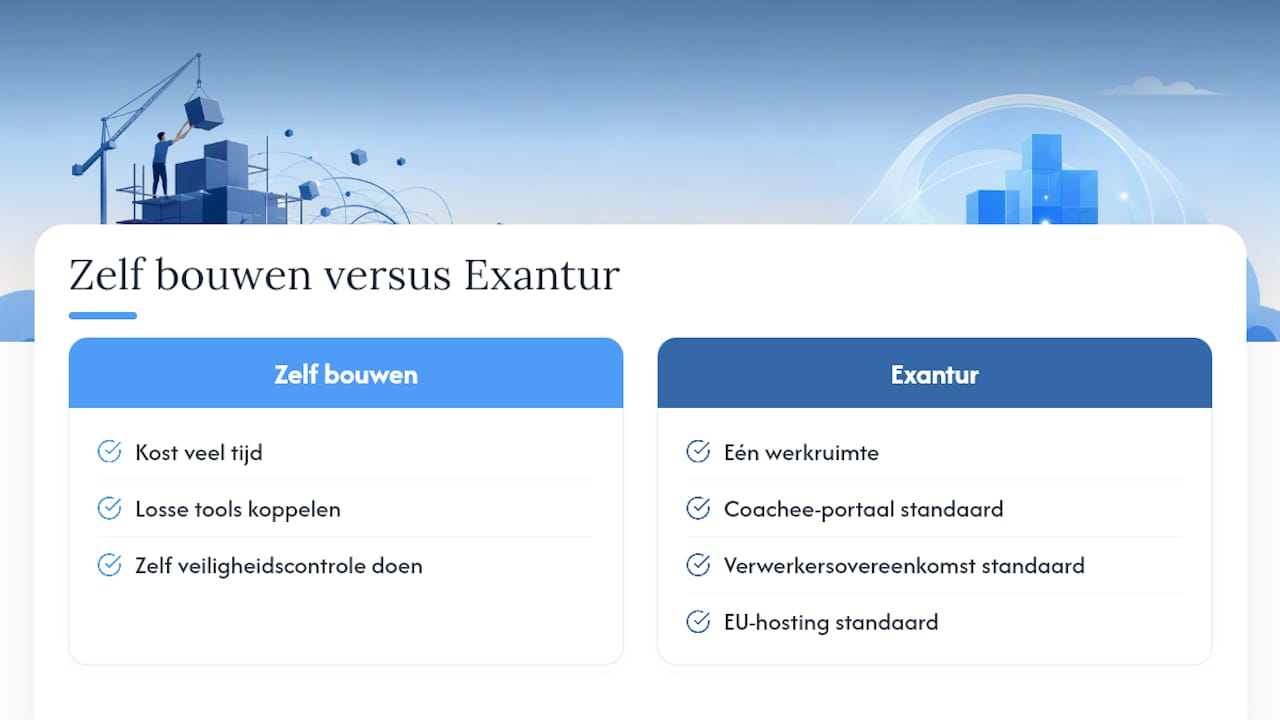
Setting up a portal yourself with all the requirements above costs time you'd rather spend on coachees. That's why Exantur is built as a single workspace in which the coachee portal, the data processing agreement and the EU hosting are already sorted as standard, instead of having to string together separate tools and figure out for yourself whether they are secure enough together.
You can try Exantur free for 14 days at no cost during the trial period. After trying it out, see which subscription suits you, from Mini to Practice, and only start paying if you decide to continue yourself. If you'd first like to see how the coachee portal looks in practice, take a look at the page about the coaching client portal.
Sources
Consult the Dutch Data Protection Authority and the European Data Protection Board for current guidelines.
Frequently asked questions
Is a free online tool secure enough for coaching notes?
Usually not. Free consumer tools often don't offer a data processing agreement and provide no guarantee about where your data is stored, which poses a risk according to the guidelines of the Dutch Data Protection Authority. For sensitive coaching information, software built specifically for this audience is a safer choice.
Do I always need to carry out a DPIA for my coaching practice?
Not always. According to the EDPB guidelines, a DPIA is required when a processing operation is likely to result in a high risk to your coachees, for example when processing health data on a large scale. For a small practice with a limited number of coachees, a solid, shorter risk analysis is often sufficient.
What should I do if a data breach occurs in my portal?
You must inform the supervisory authority within 72 hours of becoming aware of the breach if there is a risk to your coachees. Document the incident, what happened and which measures you have taken.
What does a secure client portal like Exantur cost?
Exantur works with different subscriptions. For current prices and options you can consult the pricing page. Each package includes the coachee portal with the associated security measures.
Is MFA mandatory for a coaching portal?
The GDPR does not mandate any specific technique, but MFA is strongly recommended by the Dutch Data Protection Authority for any system containing personal data. For coaching data, which is often sensitive, MFA is in practice a minimum requirement.