
Simply.Coach alternatives: the best options at a glance
Simply.Coach alternatives: the best options at a glance

For coaches who want to combine practice management with privacy, Exantur is the strongest Simply.Coach alternative. It brings together client management, session notes, and a client portal in one workspace with EU hosting, built around the relationship between coach and client rather than as a generic CRM.
That doesn't mean it's the right choice for everyone. Some coaches are better served by a specialized scheduling tool, while others prefer a broad platform that includes group classes. That's why this article compares the most important options side by side.
In short, these are the alternatives worth looking into:
- Exantur, for solo coaches and small practices that want structure and GDPR-aware hosting.
- CoachAccountable, for coaches who rely heavily on accountability and assignments between sessions.
- Acuity Scheduling, for those primarily looking for a strong, flexible scheduling tool without all the extras.
Further down you'll find a comparison table, short profiles per alternative, and a buying guide with questions for your next demo.
Key insights
The best Simply.Coach alternatives differ mainly in focus: some emphasize scheduling, others programmes, and Exantur focuses on the complete coaching relationship with privacy as its foundation.
| Point | Details |
|---|---|
| Choose based on practice format | Do you work with individual sessions or programmes? Not every platform supports both equally well. |
| Test the client portal | Let a client view goals and progress themselves before committing to an annual subscription. |
| Check GDPR hosting | Ask where the servers are located and whether a data processing agreement is available. |
| Factor in hidden costs | Extra client limits, team members, and separate invoicing tools add up when using standalone tools. |
| Exantur as first option | Offers client management, session notes, and a client portal in one workspace, with a free fourteen-day trial. |
Table of contents
- Which Simply.Coach alternatives deserve a spot on your shortlist?
- What makes each alternative suitable for your practice?
- How do you choose the right alternative for your practice?
- What exactly does Exantur offer coaches?
- How long does it take to switch to a new system?
- What does a switch really cost, including hidden expenses?
- Why privacy should carry more weight than feature lists
- Ready to try Exantur yourself?
- Sources
- Frequently asked questions
Which Simply.Coach alternatives deserve a spot on your shortlist?
Coaches usually look for the same things: less hassle, a clear client record, and a system that thinks along about privacy. The comparison below places twelve options side by side on three points that matter in practice: what the product does in one sentence, who it's best suited for, and what sets it apart from the rest.
Exantur comes first because it's the only one in this list that is fully built around the coaching process itself, from intake to final report, with a dedicated portal for the client and structured session notes that are easy to find later.
| Alternative | What it does | Best suited for | Distinguishing point |
|---|---|---|---|
| Exantur | Integrated workspace around the coaching relationship | Solo coaches and small practices that take privacy seriously | GDPR-aware EU hosting, client portal, and searchable session notes |
| Everfit | Programmes and client management with a programme focus | Coaches who offer guided programmes | Strong programme building and progress modules |
| My PT Hub | Planning and delivering session programmes | Practices with many individual sessions | Tooling for session and training management |
| Practice | Simple client management and invoicing | Coaches who only want to bundle basic administration | Targeted, no-nonsense practice administration |
| Acuity Scheduling | Online planning and booking | Coaches mainly looking for flexible scheduling | Strong calendar and booking functionality |
| Book Like A Boss | Booking page with payment options | Independent coaches without their own website system | Quick to set up, personal booking page |
| PT Distinction | Guided programmes with tracking | Coaches who need detailed progress data | In-depth client reporting |
| WellnessLiving | All-in-one wellness and coaching management | Practices that combine group classes with coaching | Broad package for mixed services |
| Mindbody | Large-scale scheduling and client management | Studios and larger practice environments | Scalability and many integrations |
| 17hats | Practice administration with workflows | Coaches who want to automate business tasks | Focus on administrative automation |
| vcita | Appointments, payments, and communication | Coaches who want to combine client contact and payments | Integrated communication and payment options |
| CoachAccountable | Accountability and assignments between sessions | Coaches who rely heavily on homework and follow-up | Extensive accountability tools |
Note: none of these providers publishes the same pricing structure everywhere. Always ask about current terms during a demo, as packages and tiers change regularly.
What makes each alternative suitable for your practice?
Each platform places its emphasis somewhere different. Below is a compact profile per option, with two questions you can ask during a trial or demo.
- Exantur suits coaches who want one place for client management, session notes, and a client portal, with GDPR-aware hosting in Europe. Ask during a demo: how does calendar synchronization work with Google Calendar, and which data never leaves the EU?
- Everfit is strong for those who guide longer programmes with fixed structures. Ask: can a client track their own progress without you having to enter every step manually?
- My PT Hub is aimed at coaches with many individual sessions alongside programmes. Ask: how easy is it to search a client record for previous appointments?
- Practice is a lightweight solution for those who mainly want to handle administration. Ask: is invoicing included, or do you need to connect it to a separate system?
- Acuity Scheduling revolves mainly around scheduling. Ask: how flexible are the booking rules if a client frequently changes their time slot?
- Book Like A Boss is handy if you don't yet have your own booking page. Ask: which payment methods are supported when booking?
- PT Distinction emphasizes measurable progress. Ask: how detailed are the reports you can show a client?
- WellnessLiving combines group classes with coaching. Ask: can you manage individual coaching programmes separately from group schedules?
- Mindbody is built for larger studios. Ask: isn't the system too heavy for a solo practice?
- 17hats automates business workflows such as quotes and contracts. Ask: how well does this fit coaching-specific documentation like session notes?
- vcita combines communication with payments. Ask: can clients also track their own goals through the portal?
- CoachAccountable is strong in assignments and follow-up between sessions. Ask: how clear does a record stay with dozens of active clients?
How do you choose the right alternative for your practice?
The right choice depends on how you work, not on which platform claims the most features. Pay attention to these points during a demo:
- Practice format: do you work with individual sessions, fixed programmes, or a combination? Not every platform supports both equally well, as Vigore also points out regarding the differences between session- and programme-oriented working.
- Client portal: can your client view their own goals, progress, and documents without email exchanges?
- Session notes: are notes searchable and linked to the right programme?
- Reporting: can you easily compile a final report from previous sessions?
- Booking and invoicing: do appointments and payments run through the same system, or do you have to switch between tools?
- GDPR requirements: where are the servers located, and is a data processing agreement available?
Pro tip: Always ask for a trial before committing to an annual subscription. That way you can test in practice whether the client portal and session notes fit your way of working.
Do you prefer targeted functionality with strong privacy features? Then Exantur is a good fit. If you work a lot with group classes alongside coaching, a broader platform like WellnessLiving makes more sense.
What exactly does Exantur offer coaches?
Exantur is built around the coaching process itself. Coaches manage client relationships, structure programmes, and record sessions in notes you can find later, divided into observations, insights, breakthroughs, and action points.
- A client portal where the coachee views goals, completes check-ins, and prepares for a session.
- Assessments such as a DISC profile and the Wheel of Life, linked to the right programme.
- Online booking with reminders and calendar synchronization with Google Calendar and Outlook.
- Invoicing through the coach's own Stripe account, without Exantur taking any commission.
- GDPR-aware hosting in Europe (Frankfurt), with a data processing agreement and multi-step login security (MFA).
You can try Exantur free for 14 days at no cost during the trial period.
How was this comparison put together?
This comparison is based on the product pages of the providers mentioned, industry blogs, and comparison sites such as Capterra, which works with user reviews and a fixed methodology. Netherlands-focused overviews such as that of Coachsoft were also considered.
- Selection criteria: practice management, client portal, privacy, trial period, booking, and invoicing.
- Always do your own trial or demo before choosing, as features and terms change.
How long does it take to switch to a new system?
Switching to a new platform usually takes less time than coaches expect beforehand. With a simple scheduling tool like Acuity Scheduling, you're often up and running within a few hours, because you only connect a calendar and set up a booking page.
With a more extensive system like Exantur, WellnessLiving, or CoachAccountable, it's different. Count on a few days to two weeks for a full switch, depending on how many client records and session notes you want to migrate. Most of the time doesn't go into setting up the system itself, but into transferring existing client data and setting up programmes the way you work.
A fourteen-day trial period, like the one Exantur offers, gives you exactly enough room to test this in practice without immediately entering into an annual contract. Start with one or two active clients in the new system while your old tool remains active for a while. Once session notes, bookings, and invoicing run smoothly, you transfer the rest of your client base. This prevents you from getting stuck in the middle of an ongoing programme with a client due to an incomplete migration.
What does a switch really cost, including hidden expenses?
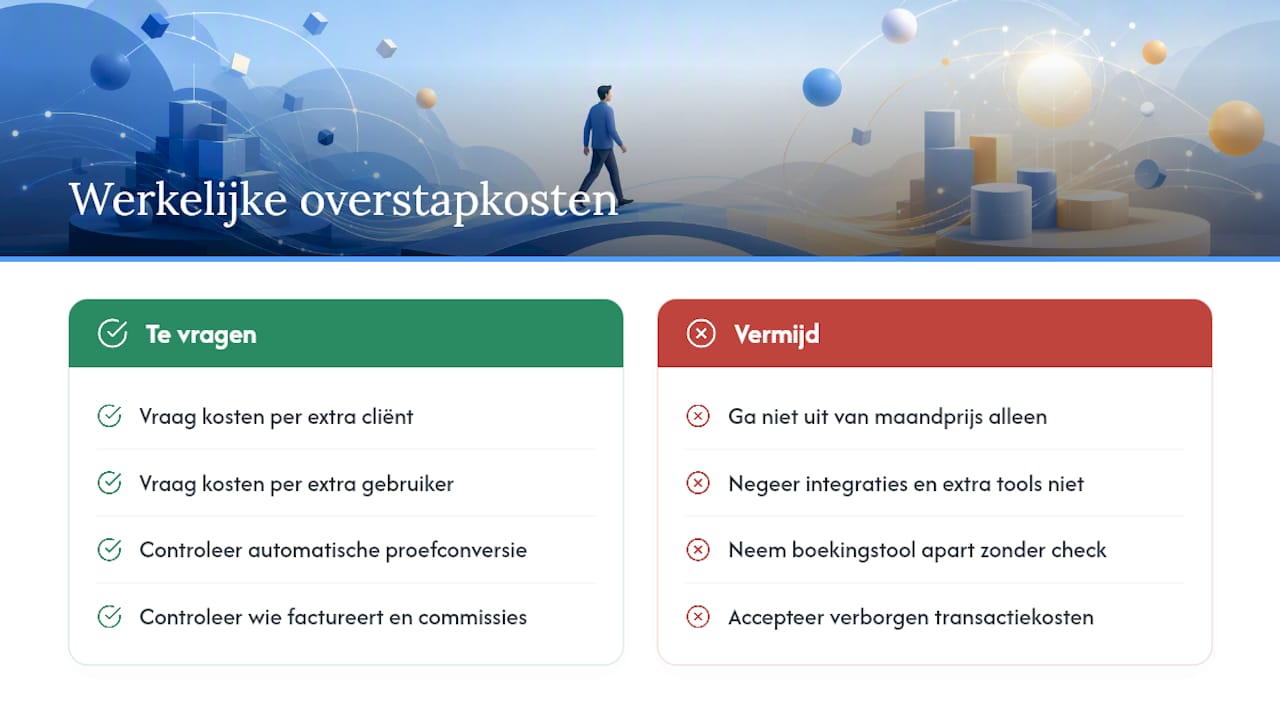
The monthly price on the website is rarely the full picture. With many platforms you pay separately for extra client limits, additional team members, or advanced reporting that isn't included in the basic package. Some tools, such as Mindbody and WellnessLiving, were originally built for studios with group classes and therefore charge for features a solo coach would never use.
Also watch out for integrations. Booking tools like Acuity Scheduling or Book Like A Boss are often standalone: you then pay separately for an invoicing system or a separate place for client records. That sum of separate subscriptions adds up faster than an integrated package.
During a demo, explicitly ask about: costs per additional active client, costs for extra users within a practice, and whether invoicing runs through your own payment account or via a commission on every transaction. Exantur, for example, works with the coach's own Stripe account, without commission being deducted from client payments. Also ask whether a trial period automatically converts into a paid subscription, as is the case with Exantur after fourteen days, so you don't face any surprises.
Why privacy should carry more weight than feature lists
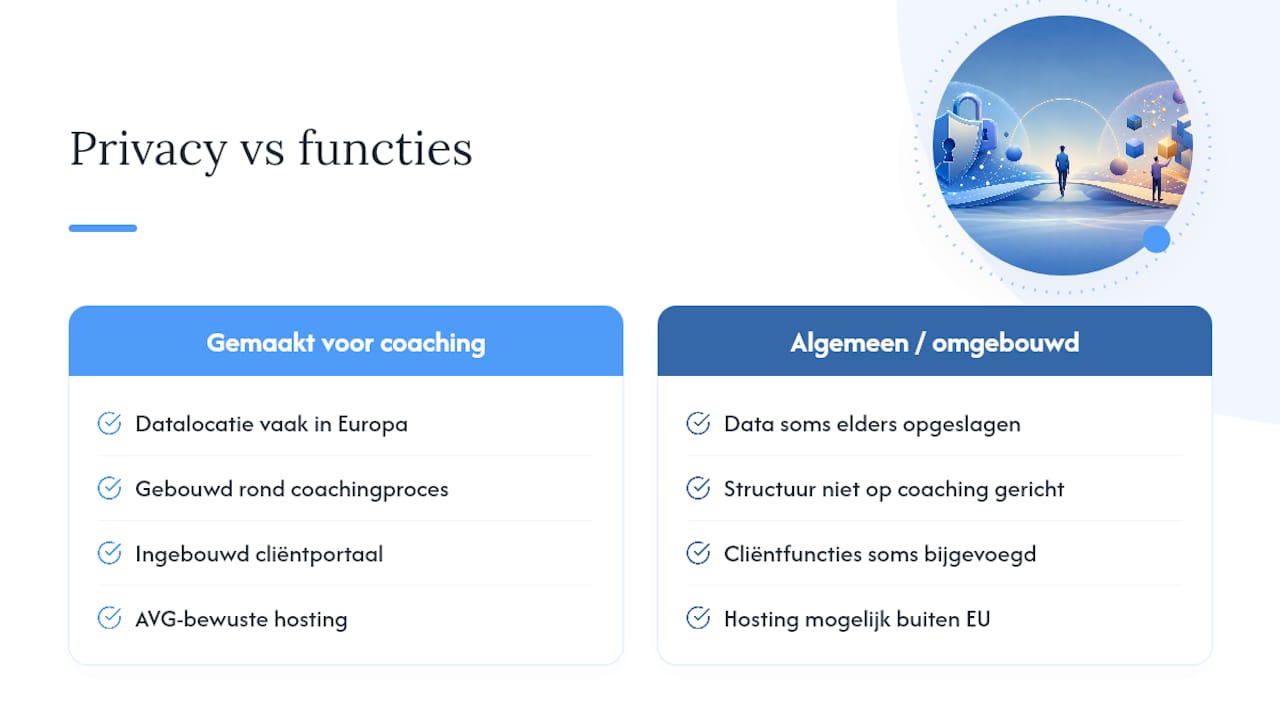
Most comparisons between coaching tools emphasize features: how many automations, how many integrations, how nice the dashboard looks. That's not what it should be about. A coach works with confidential information: personal goals, vulnerabilities, sometimes sensitive conversation content. Where that data is stored and who can access it matters more than an extra button in the dashboard.
What stands out: many platforms in this comparison were originally built for a different sector, such as personal training or studio management, and later adapted for coaching. That explains why some tools are strong in calendars and invoicing, but weaker in capturing the nuance of a coaching session.
My advice: don't start with the question "which tool has the most features," but with "where is my clients' data stored, and does the structure of this system fit how I work." A platform built around the coaching process itself, with a client portal and GDPR-aware hosting in Europe, usually fits coaches who take this work seriously better than a general scheduling system with a coaching layer on top.
Ready to try Exantur yourself?
Of all the alternatives mentioned, Exantur is the only one fully built around the coaching process, rather than as a derivative of a scheduling tool or studio system. You get client management, session notes, and a client portal in one workspace, with hosting in Europe and a data processing agreement as a foundation.
Want to see whether it fits your way of working? Start the free fourteen-day trial and test the client portal, session notes, and calendar synchronization with your own clients. Still unsure how much time you currently spend on administration? First do the coaching admin time audit to get a concrete picture before you switch.
Sources
Frequently asked questions
What are the best-known coaching techniques?
Commonly used techniques include goal-oriented coaching, solution-focused conversation, GROW model coaching, systemic coaching, and accountability-based guidance. The right technique depends on the programme and the client, not on the software you use.
How do I find a coach who suits me, or a system that suits my coaching?
Finding the right system follows the same logic as finding the right coach: look at specialization and working method, not just price. Use a demo or trial to test whether the client portal and session notes fit the way you work.
What methods are there for tracking coaching progress?
Coaches usually track progress through goals, check-ins between sessions, session notes, and periodic assessments such as a Wheel of Life. Software like Exantur links these elements to a single client record, so you don't have to search through separate documents.
Is Exantur suitable for beginning coaches?
Yes, Exantur is built for solo coaches and small practices and offers a free fourteen-day trial to test whether it fits your way of working.
What is the difference between Exantur and a pure booking system like Acuity Scheduling?
Acuity Scheduling focuses mainly on planning and booking, whereas Exantur also offers client management, session notes, a client portal, and GDPR-aware hosting in a single workspace.