
14-day trial: Satori alternatives for coaches and a switching checklist
14-day trial: Satori alternatives for coaches and a switching checklist

Anyone looking for Satori alternatives will quickly find several suitable options within practice management software for coaches. The difference lies in the focus: some tools are built around calendars and invoices, others around the coaching process itself. For professional coaches who value privacy and an approach tailored to their profession, Exantur is the recommended choice. It is built around the coaching relationship, not around a generic client database.
In short:
- Coach-focused practice software such as Exantur supports full programs and keeps client data organized, instead of just scheduling appointments.
- Choosing software with EU hosting and a data processing agreement helps make your practice GDPR-proof, but does not give a full guarantee of compliance.
- Switching often costs less time and money than you think, because you have to manually retype less data and can save on subscriptions.
- When comparing alternatives, it is important to look at features such as a client portal, calendar integration, and the ability to export data.
- Test it yourself with real clients during the trial period and export your existing notes beforehand, so you avoid the risk of data loss and missed appointments.
Table of contents
- Satori alternatives compared: which category fits your practice?
- How do you choose the right alternative for your coaching practice?
- Why is EU hosting important when choosing coaching software?
- How does software support intake, assessments, and progress?
- What does switching cost in time and money?
- How do the pricing models and features of alternatives compare?
- Which alternative fits your specialization or practice size?
- What do users say about their experiences with alternatives?
- How to switch without disrupting your practice
- Get started with Exantur today
- Frequently asked questions
Satori alternatives compared: which category fits your practice?
Before you make a choice, it helps to know which category a tool actually falls into. Not every alternative tries to be the same thing. Some are purely a calendar with an invoicing button, others are full-fledged workspaces for the entire coaching program.
Exantur is built for professional solo coaches and small coaching practices who want to bring their entire program into one system, without compromising on privacy. You manage client relationships, structure coaching programs, and record sessions in searchable notes: observations, insights, breakthroughs, and action points that you can easily find again later. You track goals, progress, and accountability (following up on the commitments a client makes to themselves) between sessions, and intake forms, assessments such as DISC and the Wheel of Life, assignments, and reports stay linked to the right client and the right program. Clients get their own portal to view goals, complete check-ins, and prepare for sessions. Around all of this, Exantur also handles the practical side: online booking with reminders, calendar sync with Google Calendar and Outlook, Zoom integration, and invoicing through the coach's own Stripe account, without Exantur taking a commission on it, as described on the page about client management software for coaches.
Besides Exantur, there are roughly three other types of alternatives, each with its own strengths and weaknesses.
- Coach-focused practice software (such as Exantur): fully geared toward programs, a client portal, and session notes. Strong on structure, less suitable if you only want to handle standalone bookings.
- Calendar-oriented booking tools: simple and quick to set up for scheduling appointments and sending reminders. They usually lack program structure, per-program note management, and a client portal with progress tracking.
- Generic CRM with coaching plugins: offer plenty of customization options because they were originally built for sales or customer service. You can often build a coaching flow into them, but that takes time and the tool remains at its core a sales tool, not a coaching tool.
- Free or lightweight tools with loose integrations: a spreadsheet for progress, a separate booking system, a standalone invoicing program. Affordable in price, but you cut and paste data between systems yourself, which is error-prone and time-consuming.
In practice, coaches work in different ways: some do standalone sessions, others guide long programs or work with programs for clients' organizations. A tool that only handles calendars quickly feels too limited once you're working with several ongoing programs and client histories. That's exactly where a coaching program structure makes the difference between a loose system and a workspace that grows with your practice.
How do you choose the right alternative for your coaching practice?
A demo or trial period only becomes useful once you know beforehand what to look for. Go through these points before you sign up for a subscription.
- Program support. Can the tool hold an entire coaching program, from intake to final report, or does it only work per standalone appointment?
- Client portal. Does the client have their own environment to view goals, progress, and homework, or does everything have to go back and forth via email?
- Intake and assessments. Are forms such as DISC and the Wheel of Life built in, or do you have to upload them separately and link them manually?
- Calendar sync. Does the calendar work automatically with Google Calendar or Outlook, or do you have to schedule twice?
- Invoicing. Can you invoice directly through your own payment account, or does the platform take a commission on every payment?
- Hosting and GDPR. Where are the servers located and is there a data processing agreement? This is the document that specifies how a provider handles your clients' personal data.
- Support. Do you get to speak with a human when you have questions, or just a help page?
During a demo, always ask the same questions: exactly where is my data stored, can I export my notes if I ever want to switch, how does the booking process work for my client, and how long does the trial period last? These questions quickly reveal whether a provider is transparent.
Pro tip: Always ask about an option to export your session notes, even if you're not yet planning to ever switch. A provider that can't point to an export function won't easily give your data back.
Watch out for a few red flags: uncertainty about where data is stored, no trial period or only a short demo, an invoicing system where the platform withholds a commission on client payments, or a salesperson who can't explain what happens to your notes upon cancellation. The page about the best practice management software for coaches works out these considerations in more detail.
Why is EU hosting important when choosing coaching software?
Session notes often contain personal and sensitive information: doubts, breakthroughs, family circumstances. Where that data is stored is therefore not a technical detail but a practical choice.
Exantur hosts data in Frankfurt, within the European Union, and works with a data processing agreement that specifies how client data is handled, as explained in the section on EU hosting and privacy. In addition, Exantur uses multiple security layers, including multi-factor authentication (MFA), an extra login step alongside your password that makes it harder for unauthorized people to access your account.
Important to know: software alone doesn't automatically make your practice fully GDPR compliant. The GDPR (General Data Protection Regulation) sets rules for how you handle personal data, and part of that responsibility always lies with you as a coach, for example in how you obtain consent or how long you retain data. A tool with EU hosting and a data processing agreement does help you along the way, and many coach-focused platforms now cite this as an important selling point. When in doubt, check the page about secure coaching software for more explanation of what a provider does and does not take care of.
How does software support intake, assessments, and progress?
A good intake sets the tone for the rest of the program. Yet many coaches still work with separate Word files or PDFs that they send out individually and feed back manually.
Exantur keeps intake forms, assessments, and reports linked to the right client and the right program, so you don't have to search between files yourself. Assessments such as the DISC profile (a model that classifies behavioral styles into four types) and the Wheel of Life (a circular diagram with which a client maps out satisfaction across different areas of life) are directly available within the system, instead of as a separate document you have to keep track of.
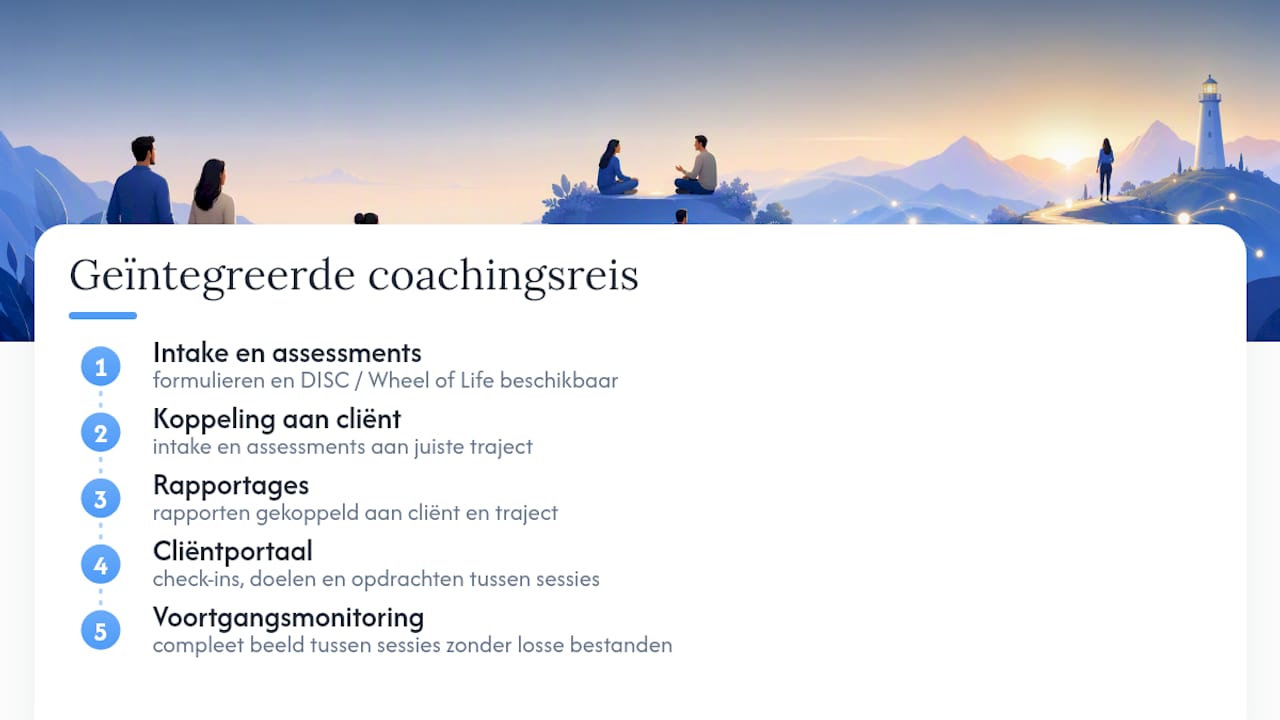
Progress monitoring works best when a client can track how things are going themselves between sessions. With their own client portal, coachees complete check-ins, see their goals again, and work on assignments without you having to send separate emails for it. That not only saves time, it also gives you a more complete picture between sessions, something that's almost impossible to keep organized with separate spreadsheets or email exchanges. More about what that looks like in practice can be found on the page about check-ins and engagement between sessions.
What does switching cost in time and money?
The question that holds many coaches back is not whether another system is better, but whether switching is worth the effort. That depends on how much time you're already losing to loose tools.
Anyone currently combining three or four separate systems (a calendar app, a standalone invoicing program, a spreadsheet for progress, a separate drive for documents) often pays for several small subscriptions side by side, and additionally loses time retyping data between those systems. That hidden time cost is usually greater than the price of the tools themselves.
Switching to one integrated system yields two kinds of savings: fewer separate subscriptions, and less time spent manually copying data. Both can be made concrete. If you want to know how much you're actually spending on your loose coaching tools combined, the stack calculator for coaching software gives an honest overview. For the time side there's the admin time audit, which maps out how much administrative time you currently lose switching between systems.
How do the pricing models and features of alternatives compare?
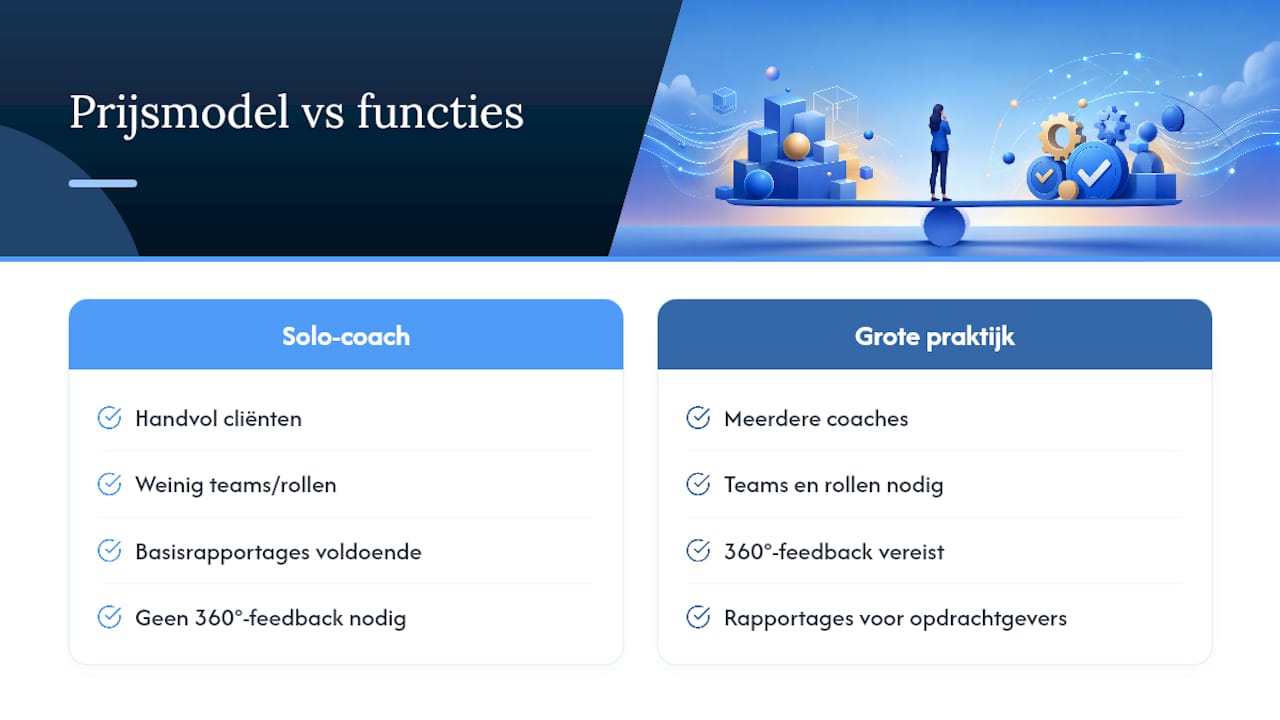
The coaching software market has no fixed pricing structure. Some providers charge per active client, others per coach, and still others work with a fixed monthly price regardless of the number of clients. That makes isolated price comparisons difficult without zooming in on your own practice size.
More important than the price itself is the question of whether a tool grows with your practice. A solo coach with ten clients has different needs than a practice with multiple coaches and hundreds of clients. Larger practices often need teams and roles, 360° feedback (where a client, alongside their own self-assessment, also has colleagues or managers weigh in), reports for client organizations about the returns of a coaching program, and sometimes their own branding in the client portal.
So don't just compare the entry price, but also whether a provider has a path for when your practice grows. A tool that's only set up to serve one coach and a handful of clients hits a wall as soon as you hire a second coach. A provider information guide such as the comparison of software categories for businesses gives a broader picture of how different software types differ in price and setup.
Which alternative fits your specialization or practice size?
Not every coach has the same requirements. A career coach who mainly guides individual programs has different priorities than a team coach who works with groups and client organizations.
For the solo coach with individual clients, program structure and a clear client portal are usually more important than extensive team features. For those working with multiple coaches in one practice, what matters is whether the system provides an overview of all coaches and clients together, with roles and permissions per user. And for coaches who work with client organizations, for example in corporate coaching, reporting on progress and results to the client is often a hard requirement.
So don't just look at features in general, but at whether a tool specifically supports how you work: standalone sessions, longer programs, or programs for a group. A system built around the coaching process adapts more easily to different ways of working than a calendar tool made only for standalone appointments.
What do users say about their experiences with alternatives?
Reviews and ratings give an impression, but say less about whether a tool fits your specific way of working than your own test period does. A high rating says something about general satisfaction, not about whether the system supports your type of program.
What comes up more often in practice is that coaches switch more readily to software that matches how they already work, rather than adapting their way of working to a generic tool. That makes sense, too: keeping notes feels different when a system already accounts for how a coaching session is structured, with room for observations, insights, breakthroughs, and action points, than when you have to rebuild that structure yourself in a loose notes field. That difference in ease of adoption is one of the reasons coach-focused software stands out from generic CRM systems with a coaching layer on top.
So always test it yourself with a few real clients before making a long-term choice. No online rating replaces the feeling of a week of really working in the system.
How to switch without disrupting your practice
Start the trial period with one complete program and a few real coachees, no fake data. That way you'll see right away whether intake forms, assessments, and check-ins work as you expect. Before going live, make an export of your existing notes and client data, so you're never left empty-handed. Tell your coachees in good time that a new way of booking and communicating is coming, and keep a short period in which you run your old and new calendars side by side. That way you avoid missed appointments during the transition.
— Martijn
Get started with Exantur today
Exantur isn't a general booking tool with a coaching label slapped on it, but software built for coaches from the very first line of code, with EU hosting and a client portal as its core rather than as an add-on. For professional solo coaches and small practices who are fed up with loose spreadsheets, separate invoicing tools, and email back-and-forth, that means less switching between systems and more overview per program.
You can try it free for fourteen days at no cost during the trial. During that period, run one complete program with a few real clients, so you can feel for yourself whether the structure fits. First take a look at the client management software for coaches to see exactly what's included, and then use the stack calculator to check what your current combination of tools actually costs you. After the trial period, the chosen subscription starts automatically unless you cancel beforehand.
Frequently asked questions
What are good Satori alternatives for coaches?
The main Satori alternatives fall into four categories: coach-focused practice software such as Exantur, calendar-oriented booking tools, generic CRMs with coaching plugins, and free lightweight tools. For coaches who value privacy and program structure, coach-focused software such as Exantur is usually the best fit.
Is EU hosting mandatory for coaching software?
No, EU hosting is not legally required, but it makes it easier to comply with the GDPR because data stays within the European Union. Exantur hosts data in Frankfurt and works with a data processing agreement.
Does software make me automatically GDPR compliant?
No, software helps you with GDPR-aware data processing, but full responsibility does not lie with the tool alone. You remain responsible yourself for things like obtaining consent and retention periods.
How much does a trial period at Exantur cost?
Exantur offers a free 14-day trial at no cost during the trial. Afterwards, the chosen paid subscription starts automatically unless you cancel beforehand.
Can I bring my existing client data to a new system?
That depends on the provider you are switching from and whether it offers an export function for notes and client data. Always check this before switching, and in any case make your own backup before going live with a new system.