
Paperbell alternatives for coaches: which tool suits you
Paperbell alternatives for coaches: which tool suits you

The best Paperbell alternatives for coaches are Exantur, Simply.Coach and Acuity Scheduling, each with a different emphasis. If you want coaching, client records and a coachee portal in one workspace, then Exantur is the coach-first choice; if you mainly need a simple booking page with payment, then Acuity Scheduling or Gigpie will do. For selling packages and managing programs, Simply.Coach is a good fit. The right choice depends on how much of your practice you want to bring together in a single system.
In short:
- Coaches who want a full overview with records, goals and a client portal are better off choosing Exantur, because it integrates everything in one system.
- For starters on a limited budget who mainly want to schedule and get paid, Acuity Scheduling and Gigpie are the simplest and most affordable options.
- Packages and program management are best supported by Simply.Coach and Delenta, especially for organizing multiple sessions and programs.
- Coaches who mainly want a reliable calendar without extra features are best served by Calendly or Lunacal.
- With every tool, it's important to ask about data location, privacy, payment structure and support to make a GDPR-compliant choice.
Table of contents
- Which Paperbell alternative suits your coaching practice?
- How do the Paperbell alternatives compare to each other?
- What exactly do the eight Paperbell alternatives offer?
- What should you look out for when choosing an alternative?
- How were these comparisons made?
- How do you switch from Paperbell to another system?
- What coaches often overlook in their choice
- Why Exantur is a logical next step
- Sources
- Frequently asked questions
Which Paperbell alternative suits your coaching practice?
Not every coach has the same needs. One mainly wants a calendar that syncs, another wants records, assignments and payments all in one place. Below is a brief overview by situation, with references to the detailed profiles further down.
- Solo coach on a limited budget. Gigpie and Acuity Scheduling are the simplest starting points. Both handle booking and payment without many extras, which is convenient when you're just starting out and don't yet have a large client base.
- Coach who sells packages and programs. Simply.Coach and Delenta are built around multi-session programs. You're not selling a single appointment, but a complete program with clear phases.
- Coach who wants to organize the entire practice. Exantur combines booking, payment, records, goals and a coachee portal in one workspace. Handy if you currently work with separate spreadsheets, a scheduling app and a separate note-taking program.
- Coach who mainly needs business administration. HoneyBook is stronger in contracts and invoicing than in coaching content, so it's suitable if you want to streamline that side of your business without necessarily needing coaching-focused features.
- Coach who only needs a reliable calendar. Calendly and Lunacal do that well, without superfluous extras you won't use anyway.
This breakdown is a starting point. In the per-tool profiles further down, you'll read where each tool does and doesn't excel.
How do the Paperbell alternatives compare to each other?
The comparison below places the eight options side by side on the points that matter most to coaches: who the tool is meant for, how billing works, what stands out, how payments flow, which integrations exist, and how privacy and ease of use are handled.
| Tool | Best for | Pricing model | Standout feature | Payment | Calendar/Zoom | EU hosting/GDPR |
|---|---|---|---|---|---|---|
| Exantur | Solo coaches and small practices who want everything in one system | Subscription, monthly or annually | Coachee portal and complete coaching process in one workspace | Your own Stripe account, no commission | Google Calendar, Outlook, Zoom | EU hosting in Frankfurt, data processing agreement |
| Lunacal | Coach who mainly wants a client-friendly booking page | Subscription (tier not publicly confirmed) | Simple, clear client pages | Not publicly specified | Not publicly specified | Not publicly specified |
| Simply.Coach | Coach with packages and program management | Subscription | Workflow focused on coaching programs | Not publicly specified | Calendar integrations available | Not publicly specified |
| Acuity Scheduling | Coach who mainly needs a strong calendar | Subscription | Extensive scheduling options and integrations | Payment integrations available | Wide integrations | Not specifically geared toward GDPR for coaches |
| HoneyBook | Coach who wants to combine business administration with client contact | Subscription | Contracts, invoicing and project management together | Built-in invoicing | Limited coaching-specific integrations | Not specifically geared toward GDPR for coaches |
| Delenta | Organization that wants to scale coaching programs | Subscription | Features for program and coach management | Not publicly specified | Not publicly specified | Not publicly specified |
| Gigpie | Coach who wants simple booking and payment | Subscription, lower entry tier | Simplicity and affordability | Payment integration available | Basic integrations | Not publicly specified |
| Calendly | Coach who only needs a calendar solution | Freemium with paid tiers | Broad integration ecosystem | Via connections with payment services | Very broad | Not specifically geared toward coaching or GDPR |
With some tools, the pricing structure or hosting location isn't publicly known. Always ask about this directly during a trial period or demo, especially if you work with client data from Europe. The growth of cloud-based coaching platforms in Europe only makes such questions more relevant, as shown by a market report on the European coaching software market.
What exactly do the eight Paperbell alternatives offer?
Exantur is built around the coaching process itself, not around a generic calendar. You manage clients, structure programs and document sessions in searchable notes, with observations, insights and action points each distinctly recognizable. Clients get their own portal where they see goals, complete check-ins and view assignments. Payments flow through your own Stripe account, without Exantur taking a cut.
- Advantage: everything around a coaching program is in one place, from intake to final report.
- Advantage: coachees have their own environment, which makes collaboration between sessions more visible.
- Advantage: data is stored on servers in Frankfurt, with a data processing agreement as the foundation.
- Disadvantage: more extensive than a bare booking tool, so getting set up takes some time.
- Disadvantage: those who only need a calendar pay for features that go unused.
Simply.Coach focuses on coaching packages and progress within a program. Users describe the workflow as pleasantly coaching-focused in comparisons, meaning you don't have to build everything yourself. The downside is that it's less focused on an extensive coachee portal than Exantur, and the privacy details aren't widely documented.
Acuity Scheduling is at its core a scheduling tool, not a coaching platform. The integrations and calendar options are strong, which makes it a logical choice if you only need a reliable booking system. It lacks records, assignments and a coachee portal.
HoneyBook combines contracts, invoicing and project management, aimed at service providers in the broad sense. For coaches who mainly want to organize their business side, that's handy, but coaching-specific features like session notes or goal tracking are missing.
Delenta and Lunacal mainly appear in market comparisons as alternatives focused on program management and client-friendly booking pages respectively. Both currently lack broad, publicly verified details about hosting and GDPR support, so it's best to ask about that directly.
Gigpie and Calendly are the simplest options. Gigpie focuses on affordable booking and payment, Calendly on a broadly usable calendar with many integrations. Both are a good starting point if your practice is small and manageable, but you'll run into limits as soon as you want to add more structure to your programs.
Pro tip: Request a trial period with a real, ongoing client case for every tool. An empty demo account will never show you how a system feels once you're managing records, assignments and payments all at once.
What should you look out for when choosing an alternative?
A good choice doesn't start with the price list, but with five concrete points: where the data is stored, how the coachee portal feels, how payments flow, what support you get, and whether the system grows along with your practice.
- Ask where the servers are located and whether there is a data processing agreement. This is mandatory under the GDPR as soon as you process clients' personal data, as the Dutch government's GDPR guide explains.
- Ask whether clients get their own login environment, and what exactly they can do there.
- Ask how payments work: through your own account or through the platform, and whether commission is withheld.
- Ask how support works: in Dutch, via email, with what response time.
- Ask whether the system grows along if your team expands with other coaches.
- Ask what happens to your data if you cancel the subscription.
A red flag is a provider that gives no clear answer to the question of where data is stored, or that uses vague payment terms without naming a concrete amount or percentage. Practical experience from other care providers confirms that simplicity and clear support often weigh more heavily than a long list of extra features, as shown by experiences with choosing practice software.
How were these comparisons made?
The comparison was built by walking through the booking flow, the payment flow and the setup of a new account for each platform, supplemented with publicly available product information and user reviews.
- Tested: how a new client books, how payment proceeds, and how long setting up a basic profile takes.
- Consulted: market research from the Coaching Federation and the official GDPR guide.
- Limitation: not every provider makes its hosting location or exact prices public, so those fields remain unconfirmed on some points.
Author Martijn wrote this overview based on experience with coach-first software design at Exantur, supplemented with public research into the other tools mentioned.
How do you switch from Paperbell to another system?
Switching sounds more complicated than it is, as long as you approach it step by step. Start by exporting your client data from Paperbell: names, contact details and ongoing appointments. Most platforms offer an export function or at least an overview page you can transfer manually.
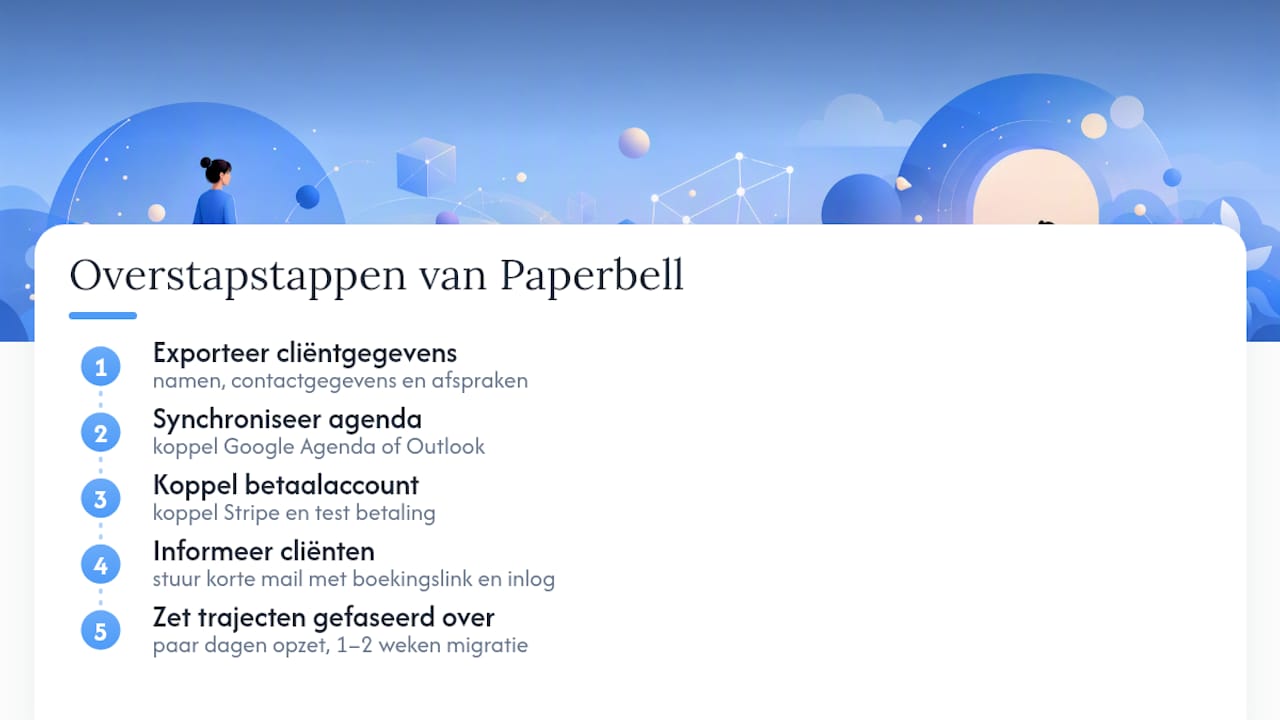
Then set up your new calendar connection before configuring anything else. A working sync with Google Calendar or Outlook prevents double bookings during the transition period when you may still be working with both systems. Next, connect your payment account, usually Stripe, and test a booking with payment yourself once before inviting clients.
Only inform your clients once the new system is fully working. Send a short email with a new booking link and, if the platform has a coachee portal, an explanation of how they log in. Count on a few days for the technical setup and another one to two weeks to gradually transfer ongoing programs, so you don't leave anyone stuck in the middle of a program.
The cost of switching usually comes in two parts: the new subscription itself, and the time you spend on setup and transferring data. With a free trial period, you can test that setup before any money is charged.
What coaches often overlook in their choice
Coaches too often choose based on the longest feature list, not based on what daily practice demands. A system built around the coaching relationship, with records and a coachee portal, saves more time in the long run than a bare calendar ever does. A simple booking tool only suffices if you don't record anything else about clients.
— Martijn
Why Exantur is a logical next step
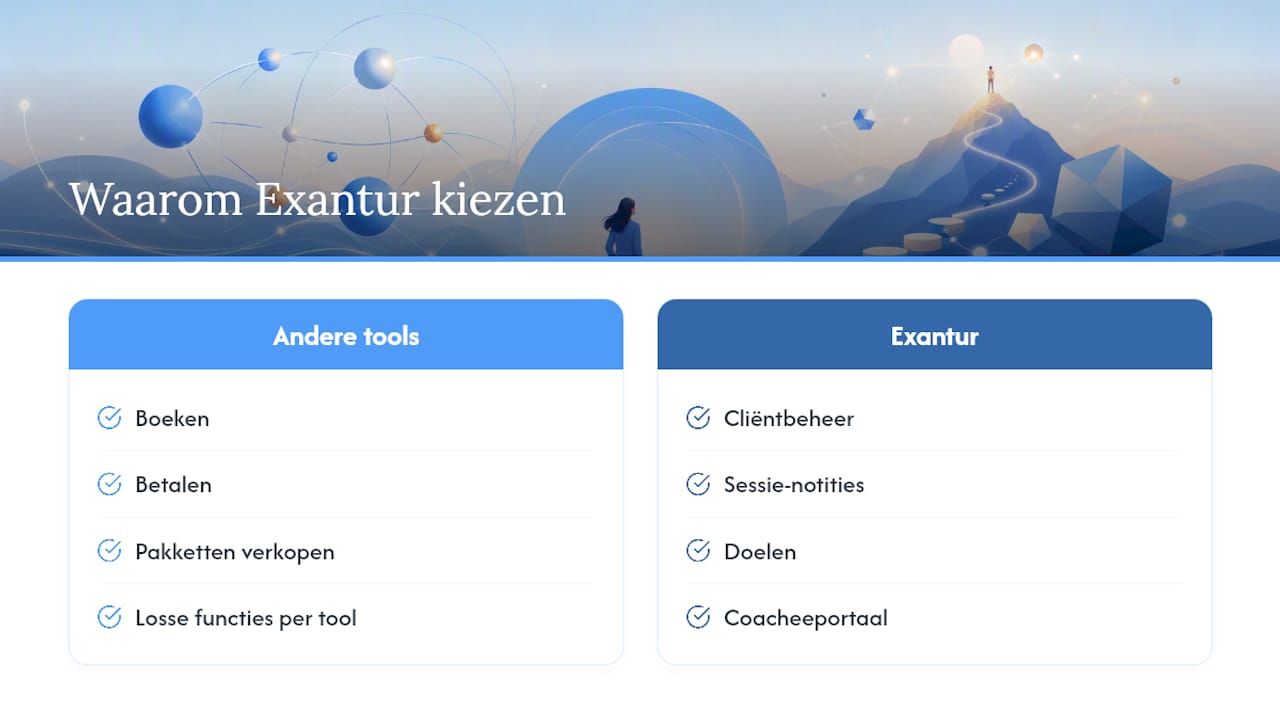
As the comparison above shows, Simply.Coach, Acuity Scheduling and the other tools mentioned each solve part of the problem: booking, payment or selling packages. Exantur takes a different approach: it brings client management, session notes, goals, a coachee portal and the practice side such as booking and invoicing together in one workspace, built around the coaching process itself. Data is stored on servers in Frankfurt, with a data processing agreement as the foundation, and payments flow through your own Stripe account without Exantur taking any of it.
Want to know how much you're actually spending on separate tools for calendar, notes and payments combined? Calculate it with the coaching software stack calculator and compare that with a trial period at a coaching practice software provider, at no cost during the trial. If you'd rather first look at a broader comparison of coaching software for the Netherlands, you'll find there the context summarized in this article. If you're working on your own booking page and also need help with your website, Durfmakers is a party that specifically focuses on that.
Sources
The Dutch government's GDPR guide and the ICF Global Coaching Study provide a factual basis for the privacy and market claims in this article.
- General Data Protection Regulation guide (Dutch government)
- ICF Global Coaching Study (Coaching Federation)
- Europe sales coaching software market report (Cognitive Market Research)
- Choosing practice software as a therapist (Mijndiad)
Frequently asked questions
What is the best Paperbell alternative for solo coaches?
For solo coaches who want to organize their entire practice, Exantur is the most complete alternative, with client management, records and a coachee portal in one system.
Which tool is the cheapest as a starting point?
Gigpie and Acuity Scheduling are mentioned as affordable entry-level options for coaches who mainly want to book and get paid, without extensive coaching features.
Do these alternatives support the GDPR?
Software can support GDPR-aware data processing, as Exantur does with EU hosting and a data processing agreement, but using software does not automatically make a practice fully GDPR-compliant.
How long does it take to switch from Paperbell?
Count on a few days for the technical setup of your calendar and payments, plus another one to two weeks to gradually transfer ongoing client programs.
Does Calendly have a coachee portal like Exantur?
No, Calendly is a scheduling tool and does not offer a coachee portal, records or goal tracking the way Exantur does.