
Upcoach or Quenza for coaches: privacy and practice management compared
Upcoach or Quenza for coaches: privacy and practice management compared

Short answer: for coaches who want integrated practice management and strong attention to privacy, Exantur is the most fitting choice. Upcoach works better for those who mainly build cohort programs with modules, while Quenza is stronger in individual assignments and check-ins between sessions. If you're torn between upcoach vs Quenza, first look at how you work: in fixed programs, in individual assignments, or in a continuous program where everything comes together.
In short:
- If your practice mainly consists of fixed programs and you have many privacy requirements, Exantur is the most suitable option for integrated practice management.
- For cohort programs with reusable modules, upcoach suits better, while Quenza is suitable for sending assignments and interim check-ins.
- When choosing, pay attention to the pricing structure, the ability to export data, and where the data is hosted, especially in light of the GDPR.
- Test a trial period by recreating real clients and programs, and check whether the workflows fit seamlessly into your daily practice.
- With data and privacy, pay particular attention to where the data is stored, whether there is a data processing agreement, and whether export options are missing, as that can cause problems later.
Table of contents
- Upcoach vs Quenza and the rest: the overview at a glance
- Which features really determine whether a platform fits your coaching rhythm?
- What does it cost and how do you test a trial properly?
- What does the GDPR mean for your choice of coaching software?
- Which platform suits which type of coach best?
- Which questions do you ask a provider before you choose?
- What do you test in the trial and how do you migrate without data loss?
- What coaches often overlook in this decision
- Ready to try Exantur yourself?
- Sources
- Frequently asked questions
Upcoach vs Quenza and the rest: the overview at a glance
Before you invest time in a trial period, you want to know which platforms even suit your way of working. Below are the twelve options that coaches are seriously considering today, with the essence of each platform.
- Exantur: integrated workspace for programs, notes, and check-ins, with GDPR-focused hosting and a 14-day trial period at no cost.
- upcoach: built around cohorts and programs, with worksheets and progress reporting as strong points according to upcoach's product description.
- Quenza: focused on sending out assignments and tracking client engagement between sessions.
- CoachAccountable: extensive reporting and workflow management for coaches who need a lot of structure.
- Paperbell: mainly revolves around booking and payment, less around deep program building.
- Profi: versatile platform that often appears in comparisons as a generic alternative.
- Delenta: combines program management with client management in one system.
- Cloverleaf: specialist in assessments and team insights, less focused on 1:1 coaching.
- Kajabi: strong for coaches who mainly sell courses and digital products.
- Podia: simple platform for selling memberships and digital content.
- FocusCoachee: European alternative focused on the client journey, with European hosting options as a plus.
- Practice Better: broad practice management, popular with both coaches and therapists.
Which features really determine whether a platform fits your coaching rhythm?
Scheduling and video calling are standard on nearly every platform these days. The difference lies in progress monitoring, personalization, and automation, precisely the features that lighten your daily coaching work according to market analyses for 2026.
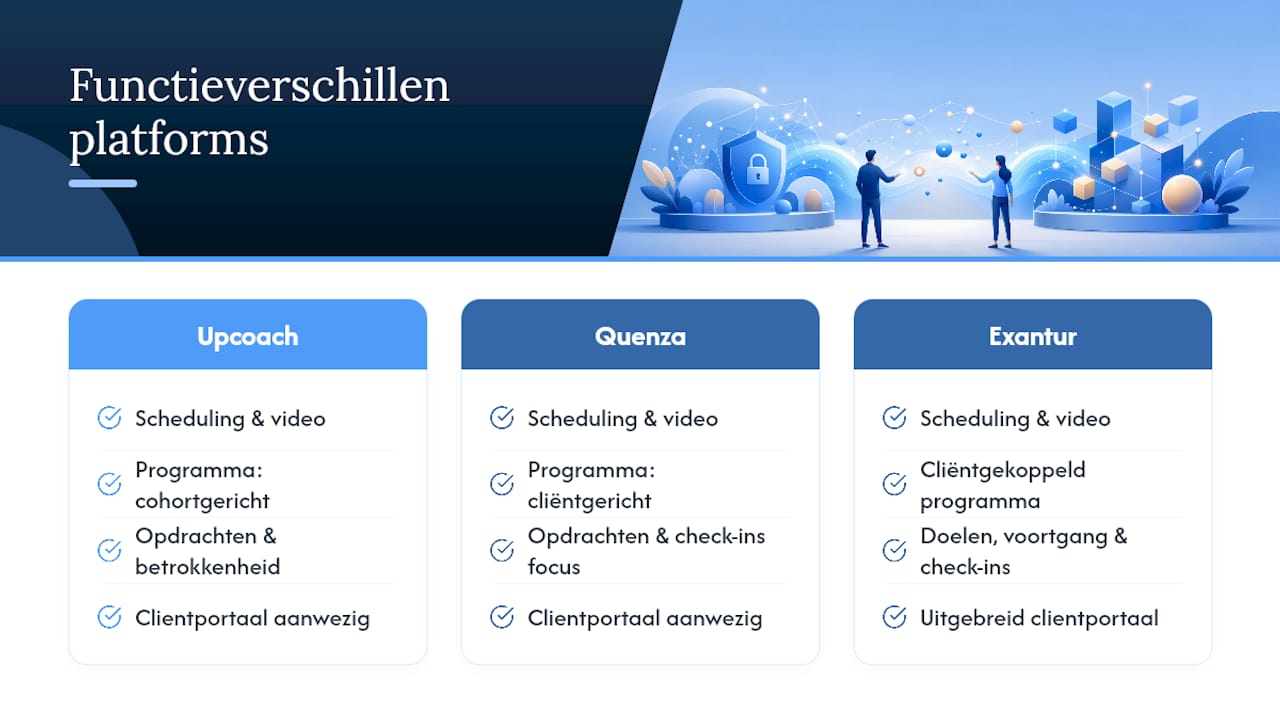
Program building and reuse. upcoach is built around reusable modules and worksheets, which makes it strong for coaches who repeat cohorts or fixed programs. Exantur approaches this differently: you build structured coaching programs that remain linked to the specific client, including intake forms, assessments such as DISC and Wheel of Life, and documents. That makes it easier to structure a program as a coaching program without keeping loose files in other tools.
Assignments, check-ins, and progress. Quenza focuses mainly on sending out assignments and measuring engagement outside sessions. CoachAccountable goes a step further with tasks and course components linked to reporting. With Exantur you track goals, progress, and check-ins between sessions within the same system where you also record your session notes as observations, insights, breakthroughs, and action points. That connection prevents you from having to keep separate notes, a separate goals overview, and a separate assignment system side by side.
Client portal and mobile experience. Nearly every platform on this list offers some form of client portal. With Exantur the coachee gets their own portal to view goals, complete check-ins, prepare for sessions, and open shared documents or assignments. Practice Better and Delenta offer similar portals, focused on broad practice administration and program management respectively.
Groups and cohort management. Do you work with groups instead of only 1:1 programs? Then upcoach clearly comes out on top here, with functionality specifically designed for cohorts. Cloverleaf adds team insights and assessments to that, which is valuable if you work with leadership teams rather than individual clients.
Automation of administration. Session reminders, calendar sync, and invoicing sound like side matters, but they determine how much time you spend on administration instead of coaching. Exantur handles online booking with automatic reminders, two-way sync with Google Calendar and Outlook, Zoom integration, and invoicing via your own Stripe account, without Exantur taking a commission on it.
What does it cost and how do you test a trial properly?
A comparison of starting prices and trial periods shows that upcoach and Quenza use different pricing models and trial options, so always check this yourself for your current number of clients. Don't just look at the starting amount, but at the pricing model itself: do you pay per coach, per active coachee, or a fixed amount regardless of your practice size? That difference can add up considerably once your practice grows.
During a trial period, test whether you really have access to all features, or whether some parts are locked behind a higher subscription. Exantur offers a free 14-day trial period at no cost during the trial. After it ends, the chosen paid subscription starts automatically, unless you cancel before the end. Also watch for onboarding costs and hidden extras. Advisory articles from 2026 emphasize that onboarding, support, and export options carry just as much weight as the bare price, because they determine how much time and friction a switch costs later.
What does the GDPR mean for your choice of coaching software?
The GDPR (General Data Protection Regulation) determines how you may process and store clients' personal data. Ask each platform where your clients' data is hosted and whether a data processing agreement is available, that document sets out who is responsible for the data the software processes on your behalf.

Also ask about export options: can you take your complete client list and records with you at any time if you decide to stop? Exantur hosts in Frankfurt, works with organization isolation between practices, supports multi-factor authentication (an extra login step alongside your password), and provides a data processing agreement. Note: software alone does not automatically make your practice fully GDPR-compliant, you remain responsible for how you handle client data. A platform that is transparent about this does give your client more reason to trust your system.
Which platform suits which type of coach best?
A solo coach who mainly works 1:1 and wants to keep track of their entire program, from intake to final report, will find in Exantur a system that ties together notes, goals, and documents. Do you work a lot with groups or cohort programs instead? Then upcoach is worth considering because of its strong module structure.
Practices with multiple coaches or strict privacy requirements would do well to look at organization features and hosting. Exantur offers teams and roles, audit logs, and white-label options for larger practices, while the EU hosting gives clarity about where client data is stored. Do you mainly sell courses or digital products alongside coaching? Then Kajabi or Podia suit that specific need better. Concrete next step: request a trial or demo from your top two candidates and test with a real, ongoing case from your own practice.
Which questions do you ask a provider before you choose?
A trial period only tells you something if you use it the way you'll actually use the software. Go through these steps:
- Add an existing client and recreate the program the way you do it manually now.
- Send a real assignment or check-in and see how the client experiences it.
- Complete an assessment and check whether the result remains clearly linked to the record.
- Test the calendar sync with your own Google Calendar or Outlook.
- Request an export file of your test client to see how complete it is.
In addition, ask every provider these eight questions: where is the data hosted, is there a data processing agreement, what does an upgrade to more clients cost, can you export everything upon cancellation, which support channels are there, in which languages is support available, how long does an average onboarding take, and what happens automatically after the trial period.
Pro tip: Never test with the provider's standard demo content. Recreate one real, ongoing client case, including the messy details, that is the only way to see whether a platform speeds up your daily workflow or actually slows it down.
What do you test in the trial and how do you migrate without data loss?
Test at least three scenarios during your trial period: onboarding a new coachee, assigning an assignment or check-in, and entering an assessment. This way you quickly see whether the platform fits how you work, rather than how the sales demo makes it appear.

For migration, three exports are essential: your complete client list, ongoing assignments, and program allocations. For a small practice with a handful of clients, count on a migration of half a day to a full working day, provided you have these exports ready in advance.
What coaches often overlook in this decision
Coaches too often compare platforms on features that hardly matter: an extra video call button, a slightly different color in the portal. What really matters is whether your notes, goals, and assignments stay connected without you having to sync three tools yourself.
I also often see that privacy only comes up afterwards, when it should be the foundation. Especially in coaching, where clients share vulnerable things, the question "where is this data stored and who can access it" deserves a place at the front of the decision process.
— Martijn
Ready to try Exantur yourself?
Exantur is the option for coaches who don't settle for separate tools for notes, scheduling, and client management side by side. Where upcoach focuses on cohorts and Quenza on individual assignments, Exantur brings your entire program, from intake to final report, together in one workspace with EU hosting in Frankfurt and a data processing agreement.
The optional AI assistant drafts session summaries and final reports based on your own notes, without client data going to the underlying language model. Want to see whether this fits your practice? Take a look at Exantur's practice management software and start the free 14-day trial. If you work with multiple coaches or are considering automating client contact around your coaching practice, this article about automating client contact is a useful addition.
Sources
- Upcoach vs Quenza: Pricing, Features and Reviews
- 9 Best Life Coaching Software Platforms | upcoach
- Online Coaching Software: Essential Features for 2026 | CoachingPortal Blog
Frequently asked questions
What is the best coaching software for a small practice?
It depends on your working style: for integrated program management with strong privacy, Exantur is a strong choice, while upcoach suits cohort programs better.
Is Quenza suitable for 1:1 coaching?
Yes, Quenza works well if you mainly want to send assignments and check-ins between sessions, though it lacks the deeper program structure that some coaches need.
Which Quenza alternatives are worth considering?
Besides upcoach and Exantur, coaches often mention CoachAccountable for reporting, Delenta for program management, and FocusCoachee as a European alternative.
What is the best CRM for coaches?
A standalone CRM (client management system) often lacks coaching-specific features such as session notes and goal tracking; platforms like Exantur therefore build that client management directly into the coaching process itself.
How do I choose between upcoach and Exantur?
Choose upcoach if cohorts and reusable modules are your main need; choose Exantur if you want individual programs, notes, check-ins, and privacy housed in one system.