
Best coaching templates for coaches with practice software
Best coaching templates for coaches with practice software

In brief:
- The three essential coaching templates are the intake form, the session plan and the progress tracker with SMART goals. They provide structure, measurability and clarity in the coaching journey. By integrating them into practice software you avoid searching around and safeguard privacy in line with the GDPR.
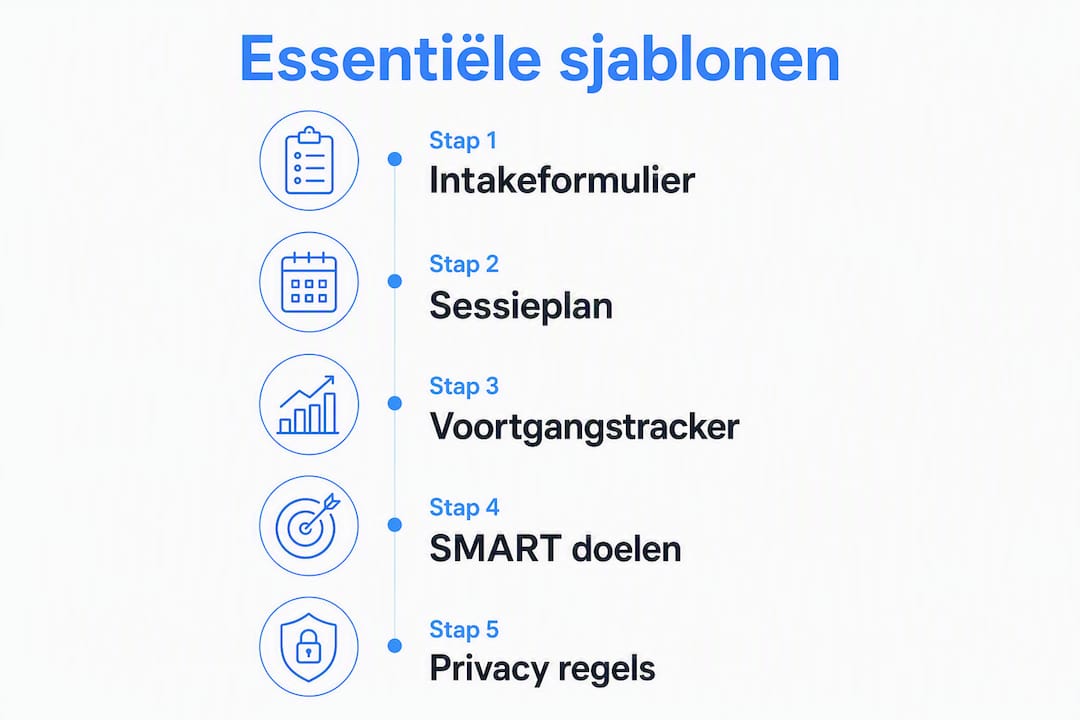
The three templates you need right away as a coach are the intake form, the session plan and the progress tracker. Together they give your practice structure, measurable progress and clear agreements. Without these three you lack the foundation for a reliable coaching journey.
- Intake form: records the background, goals and expectations of a new client before the journey begins.
- Session plan: gives every session a fixed structure with preparation, notes and action points.
- Progress tracker (SMART): makes goals measurable and ensures accountability between sessions.
If you use practice management software such as Exantur, you can link these three templates directly to client files and sessions. That way you never have to search for stray files, and you comply at the same time with the GDPR (the European privacy law for data protection).
Table of contents
- Which templates are essential and when do you use them?
- What should a good intake form contain?
- How do you structure a session plan before, during and after the session?
- How do you make goals SMART and track progress?
- How do you set templates live in your practice software?
- Which privacy rules apply to templates and session notes?
- How do you adapt a base template per coaching type?
- Copyable field lists you can use right away
- Key takeaways
- Templates only work if you take them seriously
- Exantur helps you set up templates and use them routinely
- Sources and further reading
- Frequently asked questions
Which templates are essential and when do you use them?
Good coaching templates provide structure without making conversations rigid. They help you work purposefully while staying connected to your client.
You use the intake form once, at the start of a journey. You fill in the session plan before and after each session. You use the progress tracker on an ongoing basis: you update it after each session and discuss it at fixed review moments.
The power of templates lies in the structure, not in a rigid order. Good templates help keep conversations purposeful without losing the connection.
Combine the intake and session plan from session 1. That way you immediately have a complete picture of the client and can document the first session well. You add the progress tracker as soon as the first SMART goals have been formulated, usually at the end of session 1 or the start of session 2.
Within practice management software, these templates work best because all data stays linked to the right client. You don't have to search through stray documents or emails.
What should a good intake form contain?
The purpose of an intake form is to gain insight into the background, motivation and expectations of a new client, and to identify possible points of attention (such as psychological or medical factors) early on.
| Field | Example question |
|---|---|
| Contact details | Name, email address, phone number |
| Coaching question | What do you want to achieve with this journey? |
| Motivation | Why are you seeking coaching now? |
| Previous coaching | Have you had coaching before? What did you take away from it? |
| Expectations | What do you expect from me as a coach? |
| Availability | On which days and times are you available? |
| Medical or psychological points of attention | Is there anything I should know to be able to support you well? |
| Consent for data processing | Do you give consent for processing your data in line with the GDPR? |
For intake questions, use open questions that invite the client to answer honestly. Avoid closed yes/no questions on sensitive topics.
- Always explicitly ask for consent to process personal data.
- Store the form in your practice software, linked to the client file.
- Use a separate field for medical or psychological points of attention, so you don't miss them.
How do you structure a session plan before, during and after the session?
A good session plan has three parts: preparation, recording during the session, and action points afterwards. That way you don't miss anything and can pick up right where you left off at the next session.
Pre-session checklist
- Review the notes from the previous session.
- Check which action points the client was given.
- Look at any check-ins the client has completed.
- Formulate a goal for this session.
In-session: what do you record?
Good session notes consist of four types of notes: observations (what you see or hear), insights (what the client discovers), breakthroughs (moments of real shift) and action points (what the client will do). Record them briefly and factually, not as a report but as a memory aid.
| Part | What you record |
|---|---|
| Session goal | What does the client want to achieve in this session? |
| Observations | What stands out in tone, posture or word choice? |
| Insights | What new insights has the client formulated? |
| Breakthroughs | Which moment had the most impact? |
| Action points | What will the client do before the next session? |
| Follow-up date | When will you follow up on the action points? |
Post-session action points
- Note action points with a concrete deadline.
- Assign responsibility: client, coach or both.
- Schedule a check-in if the action takes more than a week.
Pro tip: Fill in your session notes within two hours of the session. Details fade quickly, and a good note now saves you a lot of searching at the next session.
How do you make goals SMART and track progress?
SMART stands for Specific, Measurable, Acceptable, Realistic and Time-bound. A goal like "more self-confidence" is not SMART. "I will give a presentation to my team three times a week and ask for feedback afterwards, for eight weeks" is.

| Measurement point | Frequency | Responsible party |
|---|---|---|
| Progress on SMART goal | Every session | Coach and client together |
| Check-in between sessions | Weekly or biweekly | Client (via portal) |
| Interim review | Halfway through the journey | Coach |
| Final evaluation | Last session | Coach and client together |
Use the accountability scorecard to track which agreements have been kept and where a client needs extra attention. Accountability (keeping agreements and tracking progress) works best when the client also has insight into their own scores.
- Formulate a maximum of three SMART goals per journey to maintain focus.
- Link each goal to a measurable indicator that the client can track themselves.
- Schedule a fixed review session halfway through the journey to adjust goals if necessary.
How do you set templates live in your practice software?
Templates only really work when they are part of your daily workflow, not as stray documents you store somewhere. Below is a step-by-step plan to make templates operational in a system like Exantur.
- Define your fields. Determine which information you want to record per template and create a clear label for each field.
- Create the intake form. Link the form to the client file so it is automatically available for every new client.
- Set up the session plan. Add the four note types (observations, insights, breakthroughs, action points) as fixed fields in your session documentation.
- Set up the progress tracker. Create SMART goal fields and link them to a review rhythm.
- Set access rights. Determine which information the client sees in the coachee portal and what is only visible to you.
- Activate check-ins. Set when the client receives a check-in and which questions it contains.
- Test with a pilot client. Go through the entire journey with a client and note what is missing or unclear.
- Adjust based on feedback. Ask the client after the first session what was clear and what was not.
Pro tip: Start with an existing client as your pilot client, not a new one. That way you already have context and can better judge whether the templates match your practice.
Which privacy rules apply to templates and session notes?
Client data is sensitive. The GDPR obliges you to collect only data for which you have a clear reason and for which the client has given consent. This also applies to session notes and intake forms.
- Record only what you need for the coaching journey. No superfluous personal details.
- Always ask for written consent to process personal data, preferably via the intake form.
- Use software with EU hosting. This means that the servers on which data is stored are located in Europe and fall under European privacy legislation.
- Enable two-step verification (MFA) on your account. MFA is an extra layer of security where, in addition to your password, you also enter a code via your phone.
- Do not keep data longer than necessary. Set a retention period and delete files after the journey ends.
- Shared documents in the coachee portal are only visible to the client concerned.
Pro tip: Use the GDPR check for coaches to verify whether your practice meets the basic requirements. Using software does not automatically make your practice fully GDPR-compliant.
Exantur uses EU hosting in Frankfurt and offers a data processing agreement. This supports you in GDPR-aware data processing, but responsibility for compliance remains with you as the coach.
How do you adapt a base template per coaching type?
A good base template has a fixed core that works for every coaching type: contact details, coaching question, goals, action points and progress. What you adapt are the niche-specific fields.
A template is a framework, not a script. The core always stays the same: what does the client want to achieve, what stands in the way and what is the next step? Everything around it you adapt to the context.
Career coaching: add fields for current role, desired role, skills and CV status. The tone is businesslike and results-oriented.
Mindset coaching: add fields for beliefs, patterns and emotional reactions. Use open, inviting questions and a warm tone.
Health coaching: add fields for medical limitations, lifestyle habits and energy level. Be extra careful with sensitive data here and always ask for consent.
The language in your templates partly determines how engaged a client feels. Businesslike language works for career coaches; more personal phrasing suits mindset or health coaching better.
Copyable field lists you can use right away
Use these fields as a starting point. Copy them into your practice software and adjust what doesn't fit.
Intake form (core fields)
- Name and contact details
- Coaching question (open)
- Motivation for coaching now
- Previous coaching or therapy
- Expectations of the coach
- Medical or psychological points of attention
- Consent for data processing (GDPR)
Session plan (core fields)
- Session goal
- Observations
- Insights
- Breakthroughs
- Action points with deadline
- Follow-up date
Progress tracker (core fields)
- SMART goal (specifically formulated)
- Measurement indicator
- Current status (scale 1-10 or description)
- Next review date
- Client comments
| Template | Core fields | When to use |
|---|---|---|
| Intake form | Contact, goal, consent, points of attention | Start of journey |
| Session plan | Goal, observations, insights, action points | Before and after each session |
| Progress tracker | SMART goal, indicator, status, review date | Ongoing, review per milestone |
Digital templates in practice software often have a copy button or a function to duplicate fields. Always check whether the access rights are correct before sharing a template with a client via the portal.
Key takeaways
The three templates that immediately make your practice stronger are the intake form, the session plan and the progress tracker with SMART goals. Set them live in your practice software and test them with a pilot client.
| Point | Details |
|---|---|
| Three base templates | The intake form, session plan and progress tracker are the core of a reliable practice. |
| Formulating SMART goals | Link each goal to a measurable indicator and schedule fixed review moments in the journey. |
| Using a pilot client | Test templates first with an existing client and adjust fields based on feedback. |
| GDPR and EU hosting | Store client data in software with EU hosting and always ask for written consent. |
| Exantur as a system | Exantur links the intake, session plan and progress tracker to the client file in one workspace. |
Templates only work if you take them seriously
Coaches working with templates for the first time often make the same mistake: they fill in the intake form, but then forget to keep the progress tracker up to date. After three sessions they no longer know exactly what was agreed. The template was there, but it never became a habit.
What I see in practice: the coaches who get the most out of templates use them not as an administrative obligation but as a conversation tool. They open the session plan at the start of the session, discuss the action points out loud with the client and close with a concrete agreement that goes straight into the system.
The other extreme is also a pitfall. A template that is too long or too detailed backfires. Clients drop off at forms with twenty questions. Coaches lose the overview with session plans that have too many required fields. Start small. Three to five fields per template are enough to begin with. Only add something when you notice you're missing it.
And measure what clients think of it on a structural basis. Ask briefly after the second or third session how they experience the structure. That yields more useful information than an extensive evaluation at the end of the journey.
Exantur helps you set up templates and use them routinely
Coaches who want to manage templates professionally need a system that keeps everything in the right place. Stray documents, spreadsheets or generic tools miss the link between intake, session and progress.
Exantur is built around the coaching journey. You set up the intake, session plan and progress tracker once, and afterwards they are automatically available for every client. Clients fill in check-ins via their own portal, you see immediately which action points are outstanding and where someone needs extra attention. Everything is in one place, linked to the right file.
The free tools from Exantur give you a first impression of how that works. If you want to test the full system, you start with a 14-day trial via the page best practice management software for coaches.
Sources and further reading
Start with an intake form and a session plan. As soon as those work, add the progress tracker. Only scale further when you notice you need more.
- 18 life coaching templates for results-oriented sessions — comprehensive overview of template types with an explanation per application.
- How do you create your own coaching program? 4 templates — practical examples of GROW, Wheel of Life and SMART in program design.
- The coaching journey and the importance of contracting — explanation of written agreements and what a coaching agreement should contain.
- Coaching plan example — adaptable template for goals, agreements and responsibilities.
- Writing coaching session notes, a practical guide — guidelines for recording observations, insights and action points.
- Coaching program software: structure for every journey — explanation of how templates contribute structurally to coaching journeys.
Frequently asked questions
Which three templates does every coach need at a minimum?
An intake form, a session plan and a progress tracker with SMART goals. Together they give structure to the entire journey, from the first introduction to the final evaluation.
What is the difference between free and paid templates?
Free templates are useful as a starting point for field ideas, but lack a link to client files, privacy settings and accountability features. Practice software such as Exantur integrates templates directly into the coaching journey.
How do I make a goal SMART in a template?
Formulate the goal in a way that is specific, measurable, acceptable, realistic and time-bound. Add a field for the measurement indicator and a review date, so that progress remains visible.
How do I share a template securely with a client?
Use software with EU hosting and set access rights so that the client only sees their own data. Always ask for written consent via the intake form before sharing data.
How do I adapt a base template for different coaching types?
Keep the core fields (goal, action points, progress) and add niche-specific fields. Career coaching calls for fields for skills and roles; health coaching for fields for medical limitations and lifestyle.