
For coaches: GDPR-safe alternatives to Upcoach and better notes
For coaches: GDPR-safe alternatives to Upcoach and better notes

Anyone looking for Upcoach alternatives mainly wants to know one thing: which platform fits a coaching practice where client relationships, session notes and privacy are central. Exantur is the recommended choice here for professional solo coaches and small practices that want to work in a GDPR-conscious way, with Paperbell, Simply.Coach and LearnWorlds as other options worth trying. Start with a free trial or demo and test your own workflow in it, not just the feature list.
In short:
- Exantur offers a European hosting location in Frankfurt, with features for complete client and programme management, session notes and privacy protection according to GDPR standards.
- The platform handles invoicing through your own Stripe account without extra commission, and connects seamlessly with calendars and video platforms such as Google Calendar, Outlook and Zoom.
- When comparing, it is important to run through a complete workflow during the trial, including booking, session, note and invoice, to test practical use cases.
- Platforms such as Paperbell and Everfit focus on specific features (payments, programmes), while Exantur supports a broad range of coaching needs, including team management and advanced reporting.
- When choosing, look above all at ease of use, data migration, support response time and the extent to which the platform supports a natural workflow for your practice.
Table of contents
- Which Upcoach alternatives are best to compare?
- What exactly do the seven alternatives do, and who are they made for?
- How do you choose the right alternative for your practice?
- What does Exantur concretely offer coaches?
- What about payments and contract management?
- Which integrations and calendar connections do you need?
- How do mobile access and the client portal work?
- Is the interface pleasant to work in daily?
- What can you expect from support and customer service?
- Which training resources and community do these platforms offer?
- How scalable and flexible are these platforms for growth?
- What do customer reviews say about these alternatives?
- Try Exantur, or first calculate an estimate of your annual software costs
- What coaches often miss when comparing platforms
- Sources
- Frequently asked questions
Which Upcoach alternatives are best to compare?
Coaches who want to replace Upcoach usually look for three things: a place to organise clients and sessions, a way to handle payments and contracts, and certainty about where their data is stored. Not every platform does all three well. Some are built around courses, others around training schedules, and still others around appointments and invoices.
The table below places the eight most frequently mentioned alternatives side by side on the dimensions that matter most to coaches: who the platform works best for, how pricing and the trial period are structured, what its strongest feature is, how it handles European hosting and privacy, and whether the platform is suited to a solo coach or also to a team.
A few things stand out if you read this table carefully:
- Platforms such as Paperbell and Everfit are strong in one specific area (payments and programme follow-up respectively), but less built around in-depth session documentation.
- LearnWorlds and EzyCourse lean heavily on course sales. That is convenient if you offer many group products, but less relevant if you mainly coach one-on-one.
- My PT Hub originally comes from the fitness world, which is noticeable in the setup: training schedules come first, session notes are secondary.
- For European privacy legislation: many of these providers do not publicly state their hosting location. Always ask about this directly during a demo if GDPR compliance is important for your practice.
Independent overviews such as GetApp list up to twenty alternatives with varying focus, and EzyCourse publishes a current top 10 focused on flexibility and monetisation. Prices and features change regularly, so always check the current terms on the provider's own page before you take out a subscription. Coachway rightly points out that the right choice depends strongly on your coaching lane: fitness, clinical work, and life or business coaching each call for different emphases.
What exactly do the seven alternatives do, and who are they made for?
Each platform has its own origin story, and you can tell in the setup. Below is a short profile for each alternative: what it is, who it works best for, and where it really excels.
Yo!Coach is originally a tutoring platform that has expanded towards coaching. Organisations that want a fully custom look, with their own logo and house style on every page, will find a licensing model here with installation options. The provider names mobile apps as a strong point, which is handy if you reach clients mainly via a phone. Less suitable for a solo coach who wants to start quickly without technical setup.
- What it is: a white-label platform for tutoring and coaching.
- Best for: organisations that want to build their own branded environment.
- Standout: licensing options and mobile apps.
LearnWorlds revolves around courses. Anyone running a coaching practice that largely consists of online modules, videos and group programmes will find one of the strongest course builders on the market here. Session notes and individual client follow-up are clearly not the starting point here. The platform offers subscription plans with a trial period, where the exact terms may differ per country.
- What it is: a platform for online courses and membership programmes.
- Best for: coaches who offer a lot of written or filmed content.
- Standout: course building and learning experience.
Simply.Coach targets coaches who mainly seek core functionality without unnecessary extras. Client management and progress tracking are set up simply, which makes the platform accessible to anyone just starting their own practice with a limited budget.
- What it is: a beginner-friendly coaching platform.
- Best for: solo coaches with a smaller budget.
- Standout: simple client management and tracking.
Everfit is built around fixed programmes with recurring check-ins. Coaches who work with templates, such as a twelve-week programme with weekly reporting, will find a tight structure here. The subscription is often calculated per coach or per active client.
- What it is: a platform for structured programmes and follow-up.
- Best for: coaches with fixed programmes and recurring check-ins.
- Standout: programme and check-in functionality.
My PT Hub comes from the fitness world and that is noticeable in every part. Training plans, nutrition schedules and a client app form the core. For fitness and health coaches who combine coaching with concrete training programmes, this is a logical choice. Less so for life or business coaches, because the setup is not made for conversation notes or goal reflection.
- What it is: practice software with roots in personal training.
- Best for: fitness and health coaches.
- Standout: client app linked to a programme builder.
Paperbell emphasises the commercial side of coaching: booking appointments, putting together packages, having contracts signed and collecting payments without extra costs. For coaches who mainly sell sessions and tight packages, and who above all want simplicity in invoicing, this is a strong option. The depth in session documentation is more limited than with platforms built specifically for that.
- What it is: a tool focused on appointments, packages and payment.
- Best for: coaches who mainly sell sessions and packages.
- Standout: contracts and payment handling.
EzyCourse positions itself in 2026 as a flexible platform that supports both courses and coaching programmes. Anyone combining both forms of service, for example a group course alongside individual coaching, will find several ways to sell and monetise services here.
- What it is: a platform for courses and coaching products.
- Best for: coaches who combine course and coaching delivery.
- Standout: flexible monetisation and course options.
How do you choose the right alternative for your practice?
A platform's feature list tells you only half the story. You only notice the other half when you guide a client through the system yourself: from booking to invoice. So use a short, concrete checklist during every demo or trial period.
- Can I create a client file and attach session notes to it that I can search later?
- How does the system record goals and progress between sessions?
- Where is my data hosted, and is a data processing agreement available for GDPR compliance?
- How does invoicing work: via an external payment provider without extra markup, and does the platform take a commission on it?
- What happens to contracts and package agreements when a client extends or ends their programme?
- Can I connect my calendar to Google Calendar, Outlook or Zoom without switching manually?
- What does the client portal look like, and can my client fill something in there themselves between sessions?
- What support do I get during the trial period if I get stuck migrating existing data?
Pro tip: During your trial period, measure one complete workflow from start to finish: booking, session, note and invoice. A platform that presents individual features well but does not let this chain run smoothly costs you more time in the long run than it saves.
What does Exantur concretely offer coaches?
Exantur is built around the coaching relationship itself, not as a general scheduling tool adapted for coaches after the fact. You notice this in how the platform is structured.
- Client management and programmes: you organise every client and every coaching programme in one place, with intake forms and assessments such as a DISC profile or Wheel of Life linked directly to the right file.
- Session notes you can find again: you record notes as an observation, insight, breakthrough or action point, and you can search through them later. That is valuable with a client you have been guiding for months and where you want to retrieve an earlier breakthrough.
- Goals, check-ins and accountability: clients follow their own progress and complete check-ins between sessions, which shares accountability between coach and client.
- Calendar and invoicing: online booking with automatic reminders, connection with calendars such as Google Calendar, Outlook and Zoom, and invoicing via your own Stripe account, without Exantur taking a commission on it.
- Privacy as a basic condition: the data is hosted in Frankfurt within the European Union, with a data processing agreement and multi-factor login verification (MFA), an extra check alongside your password that prevents someone else from accessing your data with a stolen password.
Important to know: software alone does not automatically make your practice fully GDPR compliant. GDPR stands for the General Data Protection Regulation, the European privacy law that governs how you must handle clients' personal data. Exantur supports you in GDPR-conscious processing, but the responsibility for a correct way of working remains with you as the coach.
During a free trial period, it is best to pay attention to three things: how intuitive creating session notes feels, how clearly a client's goals and check-ins are displayed, and how smoothly the invoicing flow via your own Stripe account runs.
What about payments and contract management?
Upcoach focuses strongly on programmes and accountability, but according to several reviews it does not offer built-in contract and payment handling. That is precisely why many coaches look for an alternative that does cover this.
Paperbell is the clearest example here: the platform is built around packages, contracts that clients sign digitally, and payment flows that run automatically as soon as a session is booked. Everfit and My PT Hub also offer payment options, but these are more an addition to their programme structure than the main purpose.
Exantur handles invoicing via your own Stripe account. That means the money goes directly to your account, without Exantur deducting a commission. You link contracts and package agreements to the client file, so you never have to search in a separate system when a client asks about the terms of their programme.
With every platform, pay attention to who processes the payment and whether a percentage is withheld. Some providers work with their own payment processing and charge transaction fees for it, while others use your own payment provider without extra markup.
Which integrations and calendar connections do you need?
A coaching practice runs largely on appointments, and a platform that does not work well with your existing calendar creates double work.
Most alternatives offer some form of calendar synchronisation, but the depth varies. Some platforms only show your appointments, while others offer a two-way connection: change something in Google Calendar and the platform adjusts this automatically, and vice versa.
Exantur works with a two-way connection with Google Calendar and Outlook, plus a connection with Zoom for video sessions. When a client books a session, it automatically appears in your calendar, with a reminder beforehand so nobody misses an appointment.

Yo!Coach emphasises above all its mobile apps as an integration point, while LearnWorlds and EzyCourse focus more on connections with payment and marketing tools around course sales. With every platform, ask concretely: does the connection work automatically in both directions, or do you have to synchronise manually yourself? You only notice that difference when you have a full calendar.
How do mobile access and the client portal work?
Between sessions, clients want to be able to quickly view their goals or complete a check-in, often from their phone. A client portal is therefore not a luxury but a basic need.
My PT Hub and Yo!Coach explicitly emphasise their mobile apps, which makes sense: fitness clients often check between sessions on their phone whether they have followed their training schedule. Everfit works in a similar way for programmes with recurring check-ins.
Exantur offers clients their own portal in which they view their goals and progress, complete check-ins, track their own accountability, prepare for sessions and find shared documents, assignments and courses. That portal works via the browser, so without a client having to install a separate app, which keeps the threshold for use low.
When comparing platforms, it is smart to log in to the portal yourself as a test client. Is it clear where you need to click to do a check-in? Can you quickly find which assignment you still need to complete? A client portal that feels clear to you as the coach usually feels that way to your client too.
Is the interface pleasant to work in daily?
Ease of use is hard to capture in a feature list, but it does determine how much time you spend each day on administration instead of on coaching.
Simply.Coach and Paperbell are often mentioned as platforms with a simple, clear setup, precisely because they focus on a more limited number of features. Platforms with more possibilities, such as LearnWorlds or Yo!Coach, generally have a more extensive interface, which is more powerful but can also require a longer onboarding period.
Exantur is built as one workspace around the coaching relationship: your client file, session notes, goals and documents are together instead of spread across separate tabs or modules. That saves time especially between sessions, when you want to quickly find a note without first clicking through several screens.
During a trial period, test not only whether a feature exists, but also how many clicks it takes to use it. A calendar connection that works technically, but requires three cumbersome steps, still feels like an obstacle in practice.
What can you expect from support and customer service?
With a newly started practice, you cannot afford days of waiting on a support question, certainly not when a client appointment is at stake.
Support differs greatly per provider. Larger platforms with many users often work with a help centre and a support ticket system, where the response time can vary from a few hours to a few days. Smaller, specialised providers sometimes offer more direct contact, precisely because they serve a smaller and more manageable customer base.
Exantur is built by a small, independent European team. That means questions often go directly to the people who actually built the platform, instead of to a call centre that is separate from the development.
During a demo, always ask concretely: what is the average response time to a support question, and is help available for transferring existing client data from another system? That last point is often underestimated, while during a switch it makes exactly the difference between a smooth or a sluggish start.
Which training resources and community do these platforms offer?
Switching platforms takes time, and that time is shortened when good explanations and examples are available.
Most larger platforms, such as LearnWorlds and Yo!Coach, offer extensive knowledge bases and video guides, which suits their broader and more complex feature set. Smaller platforms often offer simpler documentation, which in turn suits their more compact setup.
Communities around coaching software are usually informal: Facebook groups, forums or their own user groups where coaches exchange tips on setting up programmes or writing session notes. This is less an official feature and more an organically grown part of every platform.
Alongside the platform itself, Exantur also offers practical free tools with which coaches can test out parts, such as templates for coaching programmes, without immediately needing a full subscription. That is a low-threshold way to get used to a particular way of working before you switch.
How scalable and flexible are these platforms for growth?
What works for a solo coach with ten clients does not always work anymore when your practice grows into a team of coaches.
Yo!Coach explicitly targets organisations that want to scale with their own branded environment. LearnWorlds and EzyCourse scale mainly in breadth: more courses, more participants, more sales channels. Everfit and My PT Hub scale well within their niche of programmes and training schedules, but less broadly beyond that.
Alongside the basic workspace for solo coaches, Exantur also offers features for larger practices: teams and roles, 360° feedback where multiple people give input on a client or coach, reporting on the return for a sponsor who pays for the coaching, an audit log that tracks who changed what, a fully custom look (white-label), and technical connections (APIs with webhooks) for organisations that want to connect the platform to their own systems.
That makes it possible to start as a solo coach and later, as the practice grows into a team, keep working in the same system without having to set everything up again in another platform.
What do customer reviews say about these alternatives?
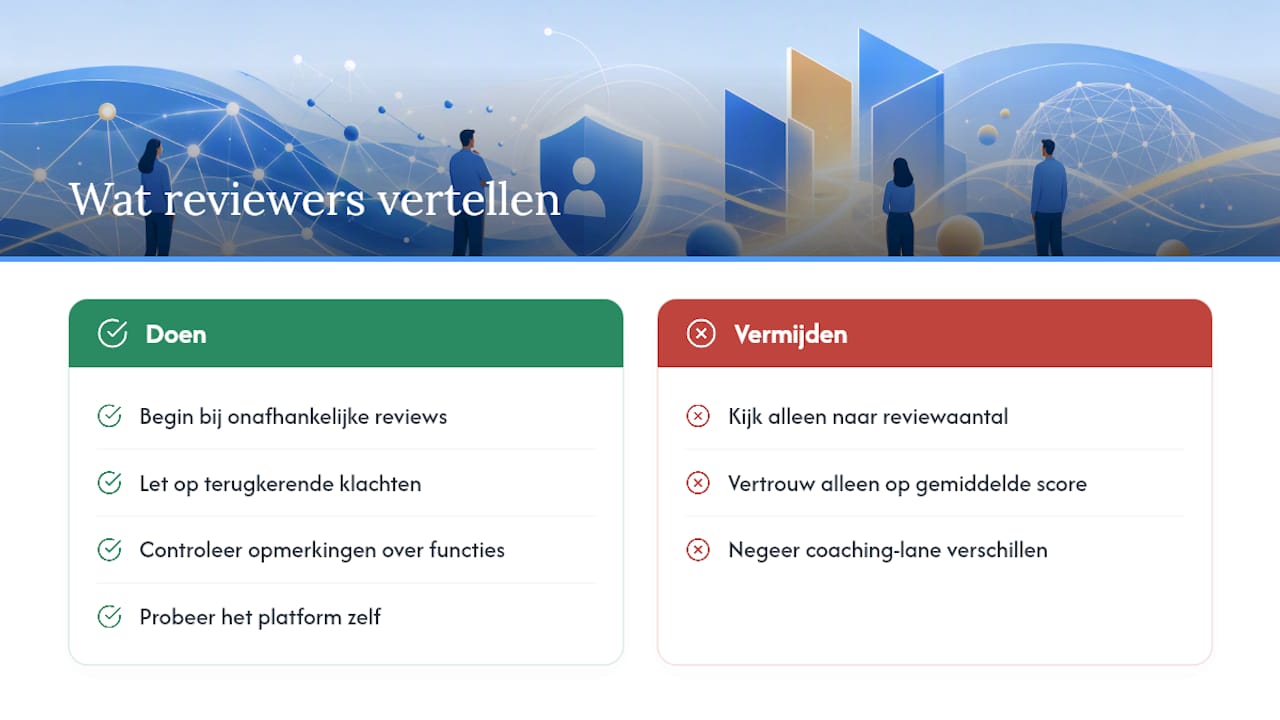
Independent overviews and review sites form an important starting point when comparing coaching software, although you should read them with some nuance.
GetApp collects user reviews and ratings for dozens of alternatives, which helps to get a picture of adoption barriers and support experiences across a broad range of platforms. That kind of directory is useful to see which complaints often recur, for example about a difficult initial setup or slow customer service.
What is important, though, is that review volume alone says little about whether a platform fits your way of coaching. A platform with many reviews may work fine for course sales and still be a poor fit for someone who mainly wants to keep in-depth session notes. So don't just look at the average score, but read on to see what reviewers concretely mention about the features that matter most to your practice.
Coachway rightly points out that the best choice depends on your coaching lane: what works well for a fitness coach need not be the best option for a business coach. So use reviews as a supplement to your own trial period, not as a replacement for it.
Try Exantur, or first calculate an estimate of your annual software costs
Do you want to not only compare features, but also know directly what a switch concretely costs you? Exantur is built as the practice management alternative designed from the ground up around the coaching relationship, instead of around generic project planning or separate course modules. You start with a free 14-day trial, at no cost during that trial. After the trial period, the chosen paid subscription starts automatically, unless you cancel before the end.
Still unsure about what a switch costs annually, compared to your current combination of tools? Use the coaching software stack calculator to estimate your annual costs before you make a choice. If you want to see straight away how the platform feels in practice, it is best to start with the trial period for coaches in the Netherlands and test for yourself how booking, session, note and invoice flow into one another.
What coaches often miss when comparing platforms
Anyone comparing platforms for the first time often focuses on the feature list and forgets the practice. A demo shows you what a system can do, not how it feels when you have ten clients each with their own pace and needs.
The biggest pitfall is that coaches use a trial period to tick off features instead of simulating a real workflow. So during your trial, create a fictitious client, schedule a session, write a note for it and send an invoice. Only then do you notice where things chafe.
During a switch, data migration is often underestimated. Discuss in advance with your new provider how existing client files and notes are transferred, and also communicate clearly to your clients when their portal changes. A short email with an explanation prevents confusion and the feeling that something is changing "secretly" in their coaching programme.
My advice: don't let yourself be guided by the longest feature list, but by how a platform feels in the daily rhythm of your practice. A tool that can do everything on paper, but requires three extra clicks in practice at every session, ultimately costs you more time than it saves.
— Martijn
Sources
For anyone who wants to compare further themselves: Life Coach Magazine describes frequently mentioned alternatives based on payment and contract functionality, GetApp offers a broad shortlist with user reviews, EzyCourse publishes a current overview for 2026, and Coachway advises based on coaching lane. Prices and features change regularly, so always check current details with the provider itself.
- Best UpCoach Alternatives – Coaching Business Software
- upcoach: Alternatives
- The 10 Best Upcoach Alternatives for Coaches in 2026
- Practice management software for coaches
Frequently asked questions
What are the best-known coaching techniques?
Commonly used techniques include active listening, asking powerful questions, setting goals using a structured model, giving feedback and reflection exercises. Which technique fits best depends on the type of coaching and the client.
What competencies does a good coach need?
Important competencies are active listening, empathy, goal orientation, providing structure, giving feedback, building trust, flexibility and the ability to monitor progress. A good practice management system, such as Exantur, mainly supports the structure and progress side of that work.
What methods exist within coaching?
Well-known methods include solution-focused coaching, cognitive-behavioural coaching, positive psychology and assessment-based methods such as a DISC profile or Wheel of Life. The choice depends on your target audience and the kind of programmes you guide.
What is another word for coaching?
Commonly used synonyms are guiding, mentoring and advising, although these terms differ in nuance: mentoring places more emphasis on knowledge transfer, coaching more on letting the client discover the answers themselves.
Is Exantur a good Upcoach alternative for European coaches?
For professional solo coaches and small practices that want to work in a GDPR-conscious way, Exantur is a strong choice thanks to its EU hosting in Frankfurt and its setup around session notes and client relationships. Test this yourself during the free 14-day trial.