
The Trackler alternative
By Martijn Mauritz · Last updated 2026-09-27
For coaches based in the EU, Exantur is the stronger choice over Trackler: fully hosted in the European Union and GDPR-ready by design, with a data processing agreement and export and deletion built in. You get client management, sessions, notes, goals and invoicing in one workspace, with no US-cloud exposure.
Exantur publishes this comparison. Competitor facts are checked against each vendor's own public sources on the date shown, and features and pricing can change. We aim to be fair and flag where another tool may suit you better.
What is a good Trackler alternative?
Exantur is a Dutch, EU-hosted alternative to Trackler for coaches who want the same progress tracking, habit-trackers and booking, plus deeper coaching documentation. Where Trackler centers on homework, e-learning and workflow automation (with Matchler adding AI coach-matching), Exantur centers on the structured coaching record: session notes split into observations, insights, breakthroughs and action points, accountability tracked across sessions, DISC-style and Wheel of Life assessments, and a coachee portal, all under strict EU data protection. Both are coaching-native and EU-hosted, so the choice comes down to whether homework and automation or documentation and accountability matter more to you.
Trackler (trackler.nl) is a Dutch coaching platform focused on progress, homework and communication in one dashboard, with habit tracking, e-learning, appointment booking and workflow automation; its sister product Matchler adds AI coach-matching on top. Priced from €49/month, it is EU-hosted. Exantur is a European alternative built around structured coaching documentation and strict EU data protection, with native habit-trackers of its own.
This is an honest comparison. Both are Dutch, EU-hosted coaching tools; the right choice depends on what you weigh most.
Trackler has real strengths worth naming up front: a clean progress-and-homework dashboard, built-in e-learning, and workflow automation that appeals to coaches who run structured programs, plus the Matchler add-on for anyone whose model depends on matching coaches to clients. Exantur is not trying to be a clone of any of that. It leans in a different direction, toward the depth of the coaching record itself, so the useful question is not which tool is better in the abstract but which set of strengths fits how you actually coach.
Where Exantur is different
Exantur structures the coaching record: session notes across observations, insights, breakthroughs and action points; accountability commitments tracked across sessions; assessments (DISC, Wheel of Life); and a coachee portal. Data is EU-hosted with row-level security, MFA and a DPA available.
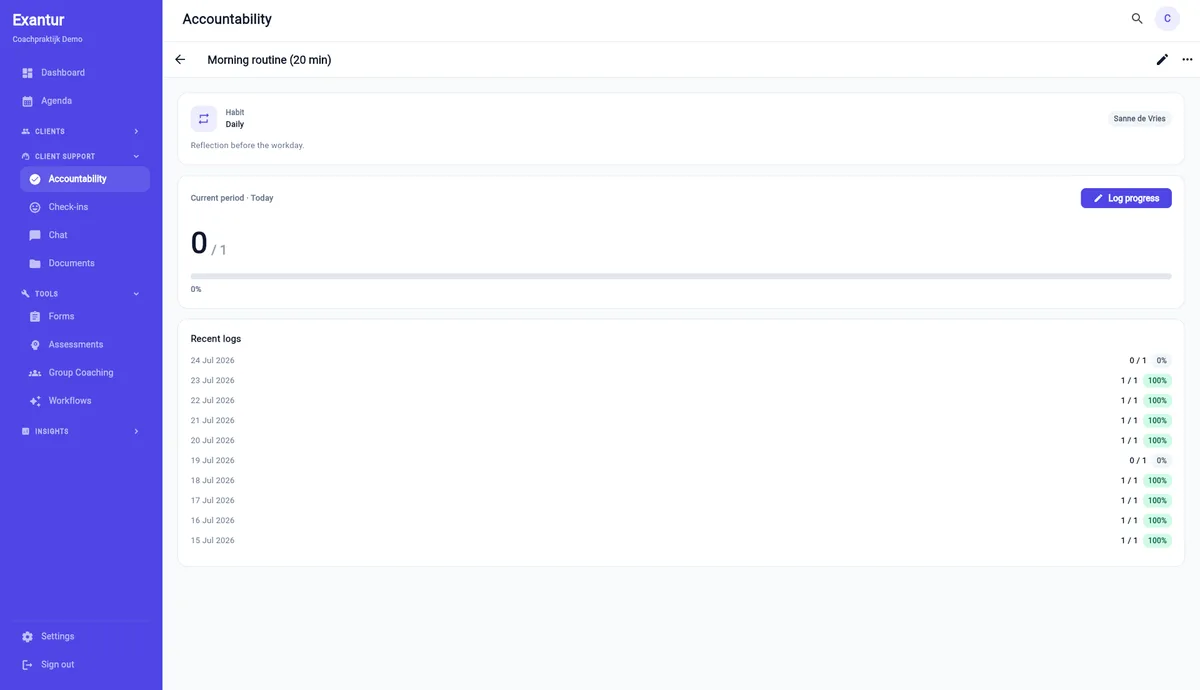
The through-line is documentation you can trust over time. Structured notes mean each session is captured the same way rather than as a freeform paragraph you skim later, coach-private notes stay separate from what the client sees, and goals carry both coach and coachee ratings with a dated history so progress is a line you can point to, not a feeling. For coaches whose value is in the quality and continuity of the work between sessions, that structure is the point.
Where Trackler is strong
Credit where it is due: Trackler is built around a tidy progress-and-homework flow that many coaches like, with e-learning and workflow automation in the same dashboard, and the Matchler sister product adds AI coach-matching that Exantur does not offer. If your practice runs on pushing homework and learning modules to clients, or if AI-driven coach-matching is central to your model, those are genuine reasons to look hard at Trackler. This page is not a hit piece; it is a comparison for coaches choosing between two solid, EU-hosted, coaching-native tools.
Where they overlap
Both are Dutch, EU-hosted coaching platforms that track client progress and give a shared overview, both include native habit-tracking with streaks, and both include appointment booking and workflow automation. Exantur adds automatic session reminders on every plan and two-way Google and Outlook calendar sync, so availability respects your real calendar.
In practice this means the everyday essentials are covered by either tool. If your shortlist has come down to these two, you are not choosing between having habit-tracking and booking or not; you are choosing which platform surrounds those essentials with the features you will lean on most, homework and automation on one side, documentation, accountability and assessments on the other.
Where Exantur goes deeper
Exantur focuses on the coaching record itself, structured session notes, accountability across sessions and assessments, on top of the shared habit-tracking and booking essentials, all under strict EU data protection. It also adds e-signature contracts (add-on), per-session video links and a client-facing AI companion that Trackler does not list.
It also brings the commercial side into the same workspace: client invoicing runs through your own connected Stripe account (Stripe Connect, 0% platform fee) with iDEAL, Bancontact, SEPA and card, and EU-valid VAT invoices, from the Starter plan up. So the notes, the accountability, the booking and the getting-paid all sit against the same client record rather than in separate tools.
How to decide
Choose Exantur if structured session notes, accountability, assessments, e-sign contracts and a client-facing AI companion matter most, with booking and calendar sync included. Choose Trackler if its particular homework/e-learning flow and workflow automation, or the Matchler AI-matching add-on, are your priority. Both are Dutch, EU-hosted and coaching-native; this is a question of priorities.
Moving from Trackler
If you decide to switch, you do not have to start from a blank page. Export your client list, programs and history from Trackler, then talk to us during a demo and we can walk through bringing that into Exantur so your active clients, their programs and their past work carry over. The goal is to make the move low-risk enough that trying the deeper documentation approach does not mean losing what you already built.
| Feature | Exantur | Trackler |
|---|---|---|
| Data in the EU | Yes, EU | Yes, ISO-certified EU hosting |
| GDPR / AVG + DPA | Yes, DPA available | Check their terms |
| Structured session notes | Yes (observations / insights / breakthroughs / action points) | Not publicly listed as structured |
| Accountability across sessions | Yes | Progress + homework tracking |
| Native habit-trackers + streaks | Yes | Yes |
| E-signature contracts | Yes (add-on) | No |
| Video links per session | Yes (Zoom/Teams/Meet) | No |
| Client-facing AI companion | Yes (add-on) | Not publicly listed |
| Appointment booking + session reminders | Yes (all plans) | Yes |
| Calendar sync (Google + Outlook) | Yes (two-way, Starter+) | Not publicly listed |
| Workflow automation | Yes (coaching workflow software) | Yes |
| Assessments (DISC, Wheel of Life) | Yes | Not publicly listed |
Frequently asked questions
- Is Exantur a good Trackler alternative?
- Yes. Exantur includes native habit-tracking, appointment booking, session reminders and calendar sync like Trackler, and goes deeper on structured session notes, accountability, assessments, e-signature contracts and a client-facing AI companion, with strict EU data protection.
- Does Exantur include booking like Trackler?
- Yes. Coachees self-book through a personal or public intake link, every booking becomes a session, availability respects your real calendar, and automatic 24-hour and 1-hour reminders plus no-show marking are included on every plan.
- What does Trackler do that Exantur does not?
- Trackler centers on a homework and e-learning flow with workflow automation, and its sister product Matchler adds AI coach-matching, which Exantur does not offer. If those are central to your model, Trackler is a strong fit. Exantur focuses instead on documentation, accountability and assessments.
- Are both hosted in the EU?
- Yes. Both Trackler and Exantur are Dutch, EU-hosted coaching platforms. Exantur adds row-level security, MFA and a DPA available on request, and you remain the data controller for your clients.
- Can I move my clients from Trackler to Exantur?
- Yes. Export your client list, programs and history from Trackler, then during a demo we can walk through bringing your active clients, their programs and past work into Exantur so you are not starting over.
See Exantur next to Trackler
Request a demo and judge the coaching depth for yourself, no obligation.